# БАЗА ЗНАНИЙ
### База знаний
База знаний проекта Relictum Pro с подробным описанием и пояснениями всех технических терминов, понятий, а так же пояснение концепции, технологии, алгоритмов и технических особенностей проекта.
## С чего начать
### Relictum Pro TESTNET
[Подробнее](/ru/baza-znanii/relictum-pro-testnet)
### Суть проекта
[Подробнее](/ru/baza-znanii/sut-proekta)
### Введение
[Подробнее](/ru/baza-znanii/vvedenie)
### Исторический обзор отрасли
[Подробнее](/ru/baza-znanii/istoricheskii-obzor-otrasli)
### Проблема
[Подробнее](/ru/baza-znanii/problema)
### Решение. Proof of Tsar
[Подробнее](/ru/baza-znanii/reshenie.-proof-of-tsar)
### Обзор и сранение конкурентов
[Подробнее](/ru/baza-znanii/obzor-i-sravnenie-konkurentov)
### Отличительные особенности и преимущества
[Подробнее](/ru/baza-znanii/otlichitelnye-osobennosti-i-preimushestva)
### Сферы применения. Социальная значимость
[Подробнее](/ru/baza-znanii/sfery-primeneniya.-socialnaya-znachimost)
### Токеномика
[Подробнее](/ru/baza-znanii/tokenomika)
### Дорожная карта
[Подробнее](/ru/baza-znanii/dorozhnaya-karta)
### Краткое описание
[Подробнее](/ru/baza-znanii/kratkoe-opisanie)
# Relictum Pro TESTNET
### Условия и порядок доступа к РЕЛИКТУМ ПРО ТЕСТНЕТ
[Подробнее](/ru/baza-znanii/relictum-pro-testnet/usloviya-i-poryadok-dostupa-k-reliktum-pro-testnet)
### Инструкция по скачиванию и установке приложения на базе Android
[Подробнее](/ru/baza-znanii/relictum-pro-testnet/instrukciya-po-skachivaniyu-i-ustanovke-prilozheniya-na-baze-android)
# Условия и порядок доступа к РЕЛИКТУМ ПРО ТЕСТНЕТ
Важным этапом на пути к любой технологической компании является период запуска продукта в тестовом режиме с возможностью доступа к аудиториям, исследованиям всех его возможностей, а также выявлению недочетов и различных неточностей.
Этот период всегда проходит через несколько этапов, что позволяет проверять работоспособность всех узлов системы на большом количестве пользователей.
### Запуск RELICTUM PRO TESTNET будет проведен в несколько этапов.
1. На первом этапе для проверки работоспособности всех узлов сети и других важных компонентов будет предоставлен доступ к сети через мобильное приложение на базе платформы Android, всем зарегистрированным пользователям, которые приобрели токены GTN.
2. Windows, IOS и Mac OS X, уже сейчас проходит проходной выпуск и готовится к выпуску.
3. После того, как все проверки уже зарегистрированы и получены, GTN-пользователи будут расширены для более широкого доступа к аудиториям.
# Инструкция по скачиванию и установке приложения на базе Android
В связи с тем, что платформа Android является более дружественной для установки и запуска приложений выполняющих сложные операции внутри операционной системы, которыми могут считать работа с сетью, работа с оперативной памятью, сложными вычислениями и пр.
Команда проекта сделала акцент на первом этапе именно на эту платформу, тем более что установка приложения .APK возможна без предварительной регистрации приложения в PlayMarket от Google, что, в свою очередь, является не самым идеальным сценарием для распространения продукта, но на этапе запуска тестнета допустимо, при условии того, что приложении на базе Android от компании Relictum PRO уже проходит регистрацию и проверку в PlayMarket от Google.
Инструкция по установке на первом этап:
1. Зарегистрироваться на сайте Relictum PRO.
2. Приобрести токенов GTN на сумму не менее 1$.
3. Перейти на страницу сайта компании [Relictum.pro](https://relictum.pro/downloads) для скачивания файла под платформу Android (Это действие необходимо выполнить на мобильном устройстве)
4. Скачать и установить приложение на своем устройстве.
5. Перейти на экран регистрации, указать свой email, использованный при регистрации на сайте, указать свой пароль и создать учетную запись.
# Суть проекта
# Что такое Relictum Pro?
Разработана полноценная распределенная платформа, на 100% надежная среда
электронного оборота данных по всем параметрам жизнедеятельности человека.
Relictum Pro — масштабируемый, гипер современный блокчейн, с расчетом на дальнее будущее. Это платформа, которая может быть использована как при тонких клиентах, так и при более мощных процессорах, базовых станций, а также, при новейших электронных и компьютерных технологиях, в том числе и квантовых компьютера.
Блокчейн — это цепочка блоков, а Relictum Pro — это система формализации событий, имеющая кроме самих цепочек блоков еще и динамические блоки. Это существенно расширяет возможности и выводит на другой уровень математического аппарата, а также, позволяет создавать не только одномерные модели цепочек, а двухмерные и даже, трехи четырехмерные модели формализации событий.
Relictum Pro – это полноценная блокчейн-платформа, способная работать как в приватном, так и в публичном доступе для государственных, коммерческих и частных видов деятельности.
# Механизмы и принципы работы
Relictum Pro — это бесконечный распределенныий реестр с развитой системой смартконтрактов, описывающиий (формализующиий) любое событие в жизнедеятельности человека, начиная от купли-продажи товаров и услуг, учета логистических событий, заканчивая отслеживанием авторских прав и взаимодействие с юридическими лицами, и включающий в себя, ряд самоисполняемых сделок (смарт-контрактов) в любой сфере деятельности.
Мы предлагаем принципиально иную схему организации блокчейн — другой принцип организации сети и формирования блоков:

# N-мерная модель смарт-контрактов
Relictum Pro — это бесконечный распределенный реестр с развитой системой смартконтрактов, которые описывают более 80% значимых событий в повседневной жизни человека.
Благодаря возможности смарт-контрактов возникает n-мерная (4-х мерная) цепочка; когда возникают новые типо-свойства смарт-контрактов, например, при автоматическом заключении сделки между несколькими участниками, когда автоматически замыкается цепочка и заключается сделка между всеми участниками (до 10 сделок).
Также, возникают следующие свойства:
* Возможность пересечения смарт-контрактов и, таким образом, описания полного типосвойства товара (возможность объединения смарт-контрактов в один — формируя "СТРОКУ описания").
* Возможность получить виртуальный портрет человека и, при желании, сделать полную выборку по разным аспектам жизнедеятельности (сколько расходует средств, что слушает, что просматривает и другое)
# Технические характеристики
В настоящее время запущен и полноценно функционирует Mainnet Relictum Pro и достигнуты следующие результаты:

\* Cкорость транзакций блокчейна Relictum Pro
# Преимущества
**Когда транзакции не только уходят в сеть, но и возвращаясь, записывают блоки в каждую ноду**
* Собственная дополненная модификация алгоритма хеширования на основе SHA1;
* Полностью отсутствуют проблемы консенсуса (не возникает задач и вопросов, связанных с решением различных неоднозначностей, таких как: коллизии, двойные траты и т.д.);
* Коллизия хешей блоков может наступить через 100 лет, благодаря сквозной нумерации каждого блока в Master\_Chain;
* Размер (вес) блока ноды от 120 до 300 байт; по расчетам, через 20 лет вес реестра может достигнуть 1 ГБ, если работать с интенсивностью режима биткойна;
* Полнофункциональные настоящие ноды в смартфонах. Это говорит о полноценной децентрализации — полноценном распределенном реестре данных, независящих от сторонних серверов и сервисов;
* Возможность хранения глобальных данных в децентрализованном распределенном хранилище — выбор каждым участником предоставления места на жестком диске и получение комиссии
* Полноценный коленчатый смарт-контракт учета и ведения логистики (например: от посадки куста кофе - транспортировки - продажи кофе - до учета выпитой чашки кофе конечным потребителем
* В данный момент реализованы следующие смарт-контракты:
1. Подпись документx
2. Генерация токенов
3. Хранилище токенов
4. Проведение транзакций
* Сформирован полнофункциональный портфель для пользователя (собственная децентрализованная биржа; обмен криптовалютами; собственная площадка для проведения ICO, кошелёк Биткойна, Эфира и Лайткоина).
* Решены вопросы, выдвинутые Ником Сабо: когда собственная разработка биометрического распознавания лица генерирует постоянный уникальный хеш какоголибо лица, что является приватным ключем при подтверждении транзакции
* Достигнуты результаты на 1 000 000 человек с точностью идентификации 99,99999 %. После выхода Альфа версии, расчетное оптимальное количество определение лиц человека без пересечений — 1 млрд. человек.
* Апробируется новая система \_HyperNet, которая отличается от действующей организации сети блокчейнов (пиринговые сети P2P)
# Сеть и ноды
В качестве транспорта Relictum Pro использует сеть коммутации виртуальных каналов
Данная организация сети дает постоянное, гарантированно устойчивое соединение между всеми узлами на ограниченный промежуток времени (от 0.5 до 10 с), в зависимости от нагрузки сети. При малой загруженности сети этот промежуток может быть до 10 с, при загруженной сети — уменьшается до менее 0.5
Узлы сети — ноды, тела нод полностью идентичны и представляют собой бинарный файл с возможностью подгрузки и управления реестром.
Нода при первом запуске определяет к какому типу она относится:


# Меморандум о запуске Relictum.Main.Net
### Предисловие
Длительные периоды разработки, длиною в “год”, “два года”, “три года”, “все еще продолжаем разрабатывать”, невообразимо высокие суммы сбора во время ICO, переполненные идеями whitepaper, и не имеющие практической реализации yellowpaper, все это, на сегодняшний день, в сфере высоких blockchain технологий - набор атрибутов, отражающих суть того или иного несвершившегося проекта. И здесь нет вины отрасли в том, что такое случается, как и нет вины нации в том, что среди нее могут быть плохие люди. Это определенный путь и правила игры, которые принимают все, кто по ним играют. К сожалению, до сегодняшнего дня практика в сфере blockchain технологий такова, что можно красиво продать идею, но не обязательно так же красиво получится ее реализовать.
Любой проект подчиняется цели, выраженной в миссии, и реализуемой в команде, и от того, насколько хорошо сложатся все три компонента, будет зависеть результат успеха. В проекте Relictum Pro, многое сложилось в положительном ключе, что сегодня позволяет с уверенностью сказать, что мы подошли к следующему важному этапу развития в нашей истории. Этот путь нельзя было пройти без шероховатостей и препятствий, неизбежно возникавших в самое неподходящее время, но, преодолевая их, крепчает сама идея и её конечный план по реализации, естественным образом корректирующийся по ходу движения вперед. Но все бы это было невозможно без двух основных несущих единиц, первая из которых выражена в команде, реализующей проект, а вторая в аудитории, его поддерживающей.
Сегодня в индустрии, в целом, можно наблюдать интересные процессы, направленные на усиление влияния проектов в области законодательного права, относительно выпуска и использования криптовалют, последовательное укреплении позиций во взаимодействии с такой централизованной системой, как государство, построение пилотных и production ready проектов в корпоративном секторе и постоянно возрастающее количестве новых пользователей, но не смотря на это, остается постоянная величина сложности вхождения и ознакомления с этой областью даже в части простого использования и расчета в криптовалюте. Проект Relictum Pro направлен на исправление этой ситуации путем реализации своей нативной и понятной платформы.
Main.Net - в переводе основная сеть. Это термин, имеющий в области blockchain технологий краеугольное значение, и отделяющий понятие проекта “на бумаге” от проекта в реальной жизни. Но, в то же время, это не конечная точка, с этого места начинается новая веха в развитии, сопровождающая новыми интересными и захватывающими заданиями, направленными на поиск новых пользователей, повышение лояльности и заинтересованности уже существующих, поиск новых вариантов использования, новых партнеров, и прочего, всего того, что может так или иначе относиться к понятию горизонтального масштабирования, при этом, не прекращая делать шаги в направлении вертикального.
### Концепция Relictum.Main.Net
По сей день в мире продолжается демонстрация недостатков существующего интернета, в первую очередь, выраженные в проблемах нарушения конфиденциальности, цензуры, проблемы сетевого нейтралитета и экономического ограничения.
Relictum Pro предлагает окончательное решение. Relictum Pro предназначен для того, чтобы стать децентрализованной платежной системой, с развитой системой умных-контрактов (смарт-контрактов), направленной на сокращение издержек во взаимодействиях между людьми, повышения уровня конфиденциальности путем использования взломостойкой криптографии, и восстановления сетевого нейтралитета, через собственный алгоритм консенсуса PoT (Proof-of-Tsar).
Наша основная задача, создать платежную систему (платформу) для всех и каждого, которая могла бы быть доступной не только профессиональным разработчикам, владеющим навыками программирования на платформе типа Ethereum, но и обычным людям, только что познакомившимися с технологиями распределенного реестра.
Нативный, интуитивно понятный, унифицированный, доступный на любой современной операционной системе интерфейс взаимодействия с платформой должен лежать в основе программы клиента для доступа к сети, чтобы при переезде с гаджета на пк, участник сети мог без особых усилий продолжить работу.
Техническая выдержанность с точки зрения следования в ногу с индустрией, но с обязательной инновацией, новаторством, выходом за рамки существующих рамок и ограничений, при проектировании разработки платформы, только так побеждают, рынок переполнен множеством хороших идей, но только лучшие добиваются результата.
### Что такое Relictum Blockchain ?
Relictum Pro - это blockchain 5-го поколения, в полной мере реализующий концепцию распределенного реестра с распределенным хранилищем, работающий как в публичном, так и в приватном плане, где каждое устройство это узел (нода), с пропускной способностью более 100,000 tps. Relictum Blockchain не является форком, не использует в своей реализации какие либо сторонние существующие наработки в области blockchain, а реализован как автономная самостоятельная платформа с заделом на большое будущее, с точки зрения реализации децентрализованных экономических моделей.
Ключевые новшества проекта выражены в трех основных составляющих, на которых строится любой blockchain проект:
* Архитектура blockchain, включающая в себя улучшенную облегченную организационную структуру блоков и криптографию;
* Консенсус с элементами искусственного интеллекта и мгновенным способ передачи данных синхронизации
* Смарт-Контракты, поддерживающие возможность построения n-мерных структур для реализации идеи коленчатых смарт-контрактов.
Кроме инноваций в техническом плане, в нашем проекте реализована специальная экономическая модель, при которой достигается решение двух основных задач, а именно: ценности и полезности, в виде двух самостоятельных экономических единиц: Genesis Token и Relict Stable Coin
Процесс увеличиния “процента” децентрализации в сети Relictum прямо пропорционален росту количеству пользователей внутри сети, образующих несущую силу, в отличии от существующих суррогантных аналогов с DPoS в основе, пытающихся насаждать искусственную децентрализацию, путем предоставления возможности объединения в пулы и прочее.
Мы знаем свои слабые места и каждый день работаем над ними.
Наша следующая цель, предоставить всем желающим ознакомиться с нашими разработками в виде исходного кода, и убедиться в их основательности.
Подробнее о нашем проекте прочитать о том, что из себя представляет Relictum Blockchain можно в whitepaper, yellowpaper и в токеномической модели.
### Дорожная карта запуска Relictum.Main.Net
Для обеспечения плавного и безопасного развертывания всех узлов платформы требуется последовательное и аккуратное введение в эксплуатацию всех компонентов системы.
Это последовательный процесс, сопряженный с непрерывной проверкой состояния, подтверждением об успешном включении, и начале работы.
Relictum Pro представляет из себя сложную многокомпонентную систему, главными составляющими которой являются уникальные сеть, где каждое устройство может быть нодой.
Консенсус, обеспечивающий реализацию логической и архитектурной децентрализации, а также сам blockchain, в виде распределенного реестра, с одной главной цепью, и параллельно-связанными цепочками.
Процесс запуска Main\_Net будет происходить в несколько стадий, на каждой из которых будет последовательно добавлен новый функционал, повышена стабильность.
Клиенты нод для мобильных платформ будут доступны на платформах PlayMarket и AppStore, с указанием контрольных сумм сборок на github.com
### Стадия №1 (Рождение) - Развертывание сети, подключение базовых подсистем, закрытый доступ
Инициализация сети из первых 7 нод, необходимых и достаточных, для запуска и работы консенсуса Proof - Of - Tsar (PoT), первого в своем роде, работающего не на базе выполнении той или иной задачи, а по схеме теории игр, где каждый из участвующих узлов, имеющий определенный рейтинг, имеет возможность сыграть в игру, за право принять и записать все транзакции в блоки.
В число основных компонентов войдут, такие подсистемы как:
* Модуль ядра ноды - системные компоненты, отвечающие за самоопределение ноды, криптографию, обновление, взаимодействие с реестром, операции по чтению, записи
* Модуль сетевого - транспортного уровня, необходимого для коммуникации между нодами, работающего на базе TCP/IP.
* Модуль консенсус - компоненты, отвечающие за подсчет рейтинга, участие в игре.
* Модуль встроенных смарт-контрактов Relictum System Smart-Contract
1. Смарт-контракт Транзакции
2. Смарт-контракт Аккаунта
3. Смарт-контракт Токена
4. Смарт-контракт Подписи
* Модуль криптографии - модифицированный SHA1М, процедуры асимметричного шифрования.
* Модуль Main.Net Explorer
Текущий статус данной стадии - выполнено.
### Стадия №2 (Первый после Генезиса) - Публичный доступ к сети
На второй стадии запуска участникам сети станет доступен публичный доступ к Relictum\_Main\_Net.
Данная стадия станет одной из наиболее важных, в продолжении процесса запуска Relictum\_Main\_Net, поскольку на этом этапе, будут доступны продукты платформы для пользования широкой аудитории, и нужно будет крайне внимательно следить за состоянием работы всех узлов и показателей системы.
В число компонентов, которые будут доступны на второй стадии, войдут:
* Все модули и компоненты, активированные на стадии №1 (Рождение)
* Модуль секретный чат
* Модуль DEX
* Процедура импорта GTN токенов, приобретенных во время Token Sale
* Дополнение системных смарт-контрактов:
1. Смарт-Контракт Forging RLC
2. Игровой Смарт-Контракт Head & Tails
3. Игровой Смарт-Контракт Dice
* Клиенты для доступа к сети для следующих платформ:
\* Десктопные клиенты с графическим пользовательским интерфейсом:
\- Windows
\- Mac OS X
\* Консольные клиенты:
\- Windows
\* Мобильные клиенты:
\- Android
Минимальные рекомендуемые характеристики для сервера, подходящего для развертывания ноды в качестве белой следующие:
* CPU: Intel Core i3
* Total traffic: 50TB traffic per month
* Uplink: 100Mbit/s Premium Network
* Memory: 16GB DDR3 RAM
* Data storage: 1x 512GB SSD
Максимально рекомендуемые характеристики для сервера:
* CPU (cores): Intel Core i5
* Total traffic: 1GBit/s traffic per month
* Memory: 32GB DDR3 RAM
* Data storage: 1x 1024GB SSD
На период действия второй стадии запуска, в целях контроля системы будут действовать определенные ограничения на действия внутри системы, а именно:
* Максимальная сумма покупки RLC за одну транзакцию 100$
* В одну секунду можно будет сделать не более одной транзакции
Текущий статус данной стадии - готовится к запуску.
### Стадия №3 (Цифровой сейф) - Подключение системы децентрализованных хранилищ.
Одним из центральных продуктов в экосистеме Relictum Pro является система децентрализованных хранилищ именуемая “Цифровой сейф”.
Функционал данной системы имеет одно из краеугольных значений внутри системы, так как предоставляет возможность как хранения файлов в безопасном и недоступном для недоброжелателей виде, в то же самое время, является системой, на которую возложены функции монетизации для тех, кто желает предоставить свои хранилища в доступ для сети.
Подробные характеристики и содержание обновления данной стадии будут опубликованы ближе к запуску.
### Стадия №4 (RVM) - Запуск RVM.
### Подключение модуля динамических смарт-контрактов.
Полная и безоговорочная децентрализация, абсолютный уровень развития с точки зрения использования и применения. На ряду со сверхбыстрым консенсусом, мощной криптографией, последний штрих, для того, чтобы можно было сказать, что пазл собрался, картинка теперь полная.
RVM - Relictum Virtual Machine специальный модуль запуска и исполнения смарт-контрактов внутри сети Relictum.
На ряду со сверх быстрыми системными смарт-контрактами, доступными уже на более ранних стадия использования Relictum Pro, данное обновление позволит всем желающим написать смарт контракты на специальном языке, загружать их в сеть и предоставлять для пользования всем желающим.
В связи со сложностью данного модуля, предоставить конечные характеристики и инструкции по работе с ним, на данным момент не предоставляется возможным, так как многие из них корректируются прямо сейчас во время разработки, отладки и тестирования.
Но к моменту запуска третей стадии Main Net, будут опубликованы инструкции api и sdk на нашем канале в github \[github.com/relictumblockchain]
Содержимое стадий может корректироваться на усмотрение команды, в связи с постоянным мониторингом показателей работы и отслеживанием тех или иных критически важных составляющих платформы.
Следите за новостями, даты запуска каждой стадии будет публиковаться на сайте.
С уважением, команда Relictum Pro
# Введение
# Что такое Блокчейн?
Это выстроенная по определённым правилам непрерывная последовательная цепочка блоков (связный список), где каждый следующий блок имеет хеш предыдущего блока.
Это глобальный, масштабный распределенный реестр, работающий с миллионом компьютеров и доступный каждому. Любые ценности, от денег до музыки, могли бы храниться, перемещаться, обмениваться и управляться без могущественных посредников (таких как банки, корпорации, вплоть до государства). Информация распределена по глобальному реестру. Когда люди могут повсеместно доверять друг другу и сотрудничать на равных. И доверие основывается не на авторитете организации, а на сотрудничестве, криптографии и умном коде.
**Доверие основывается не на авторитете организации, а на сотрудничестве, криптографии и умном коде.**
# Исторический обзор отрасли
История Блокчейн берет начало с 2008 года, когда вышла криптовалюта Биткойн.
В Биткойн блокчейн обслуживает только эту криптовалюту двумя смарт-контрактами.
Все попытки формализовать большинство событий смарт-контрактами в единой платформе блокчейн до сих пор не привели к успеху.
* Первое поколение блокчейн состояло из первой монеты такой как биткойн, основанной на доказательстве работой (PoW), её различных клонов и форков. Такая инициатива биткойна теперь называется blockchain 1;
* Второе поколение БЧ более неоднородно, основанное на использовании токенов, таких как Ethereum и его экосистемы решений. Эти две категории характеризуются очень низкой энергоэффективностью и низкой скоростью транзакций. Теперь мы называем его blockchain 2;
* Третьему поколению blockchain 3 относятся те, с помощью которых пытались дать ответы на вопросы относительно скорости транзакций и невозможности масштабирования с использованием различных механизмов.
* Blockchain 4.0 все лучшие функции блокчейна 3-го поколения (более быстрое согласование, сверхбыстрое подтверждение транзакций)
* Relictum Pro это Blockchain 5.0
Новая сеть будет включать в себя все предыдущие функции blockchain наряду с революционными новшествами.
### Организация сети:
В конце 70 - начало 80-х годов появились новые типы сетей, так как появились новые типы процессоров, сетевые карты, которые должны были обмениваться данными между собой и появился сетевой протокол который назывался х32. Этот протокол позволял соединяться с компьютерами различной конфигурацией сети: звезда, кольцо, смешанные коммуникации сетей — т.е. Ethernet.
Он до сих пор используется во всех сетевых соединениях - внутри дата центров, WiFi. Протокол работает по проводным соединениям, радиоканалам, спутниковым каналам, сеть Ethernet. При увеличении количества компьютеров и расстояния между ними, использовать Ethernet стало проблематично.
Ethernet — сетевой протокол, он работает под управлением сети коммутации каналов, т.е. коммутируются сами каналы. Интернет — сеть коммутации пакетов, где есть четырехзонные адреса, так называемые IP-адреса.
Адреса соединяются между собой единовременно для передачи одного пакета, после передачи пакета соединение разрывается. Так как Интернет не позволяет гарантированно передать сообщение, для этого используется подтверждение на которое необходимо затратить время. Данный протокол работает на верхнем сетевом уровне, включая прикладной.
# Проблема
Сегодня, на пути развития технологии блокчейн и приложений на базе блокчейна, существует ряд основных проблем, препятствующих дальнейшему развитию как самой технологии, так и экосистемы, в целом. Это такие проблемы, как невозможность масштабирования для использования технологии в крупномасштабных проектах, низкая производительность, отсутствие поддержки различных бизнес-сценариев и неспособность обмена информацией и активами между разными блокчейнами.
### На данный момент реально работающий блокчейн — это Биткойн, остальные основаны на Биткойн, так называемые форки.
В данных системах блокчейн является только частью криптовалют, который обслуживает только свою криптовалюту.
Основной проблемой в мировом сообществе разработчиков системы блокчейн является создание универсальной платформы, которая может обслуживать не только лишь одну криптовалюту, но и учет логистических событий, отслеживание авторского права, арбитраж, хранение данных в децентрализованном хранилище, а также самоисполняемые сделки (смарт-контракты) в любой области жизнедеятельности человека. На данный момент сообщество пока не в силах предоставить такую универсальную платформу. Это связано с тем, что инерция мышления не позволяет выйти за рамки устоявшихся стереотипов и мнений.
### Основные проблемы современных блокчейнов:
Большой размер блока
### Размер каждого блока биткойна в 8000 раз больше блока Relictum Pro
Нецелесообразно в один блок вмещать все транзакции, которые невозможно поместить в один блок. Это ведет к уменьшению скорости обработки данных, уменьшению скорости передачи данных, а также, к снижению скорости поиска необходимой информации.
На сегодняшний день, в сфере технологии блокчейн существуют проблемы, которые, тем или иным образом, blockchain Relictum Pro способен решить:
* Использование криптовалюты в качестве надежного платежного инструмент
* Масштабируемость
* Энергозатратность
* Мобильность
* Удобство и комфорт
* Скорость транзакций
* Дорогостоящие транзакции (В блокчейне Relictum Pro цена транзакции = 0)
* Проблема атаки 51% (Проблема исключена, так как каждая транзакция имеет свой идентификатор, 1 блок = 1 транзакция)
* Низкая пропускная способность (В Relictum Pro 100 000 транзакций в секунду)
* Defi токены (Обернутые монеты Ethereum, Bitcoin, Litecoin и Tether
Существующие системы, на данный момент, используют тип сети P2P, на котором строятся не только передача сообщений, но и хранение фрагментов файлов распределённые хранилища (на базе коммутации пакетов (Интернет), что подразумевает подтверждения доставки, ненужные заголовки в теле пакета, а также использует мощности центрального процессора на сборку фрагментов. P2P использовалась для передачи файлов для файлообменников. Файлообменники были необходимы, чтобы была возможность скачивать фильмы, программы и документы.
### **Принцип работы:**
Один узел соединяется с несколькими и по частям скачивает данные с других узлов. Таким образом, скорость скачивания приближалась к максимальному значению сетевой карты и скорости провайдера.
### **Недостатки P2P:**
Не позволяет на сегодняшний день работать с большим количеством нод. При большом количестве узлов сеть P2P начинает работать с сегментами. Пока не закроется один сегмент, второй не разворачивается. Сегментация происходит постоянно и с разных сторон, сегменты начинают перекрываться, увеличивается время подтверждения транзакций всеми нодами, что плохо влияет на скорость распространения и время передачи данных.
### **Проблема атаки 51%:**
Атака 51% (на самом деле от 46%, так как не все участники сети в какой-то момент времени способны участвовать в голосовании) – термин, который обозначает, что в распоряжении атакующего должны находиться мощности бОльшие, чем у всей остальной сети, своего рода «контрольный пакет» генерирующих мощностей. Достигается это вследствии того, что Сеть с консенсусом принимает решение о проведении транзакции. На примере сети Ethereum: чем больше размер сети, тем ниже её производительность. Есть множество попыток решить эту проблему с помощью дополнительных консенсусов. Например, Casper в Эфире.
### **Проблема утраты ключей**
Ключ приватный и ключ публичный. После подписи транзакции приватным ключом, публичный ключ нужен для проверки и подтверждения подлинности подписанной транзакции.
### Распределение блок-биткоинов на 3 января 2019
# Решение. Proof of Tsar
С целью решения существующих проблем мы предлагаем ряд изменений в архитектуре блокчейна, затрагивающие протоколы связи, сетевую инфраструктуру, межсетевые соглашения, консенсусные алгоритмы и прочее.
Платформа Relictum Pro не зависит от способа коммуникаций, просто есть нода, а каким образом доставлено сообщение, не имеет значения.
На данный момент используется собственная технология коммуникаций — \_HyperNet, которая работает над или поверх Интернет.
Следующий способ организации сети в будущем может быть использован на базе Bluetooth, WiFi, спутниковая связь, т.е. коммутации каналов на базе Bluetooth и/или WiFi и других перспективных протоколов.
### Организация сети — первый отличительный механизм
Существующая организация сети современных блокчейнов — это пиринговые сети (P2P). В блокчейн-платформе Relictum Pro используется уникальный протокол, в основе которого лежит протокол TCP/IP, в котором виртуальный канал связи с каждой нодой образуется поверх сети Интернет. Преимущества данной сети в ее надежной устойчивости и изолированности от общего сегмента сети Интернет. В этом виртуальном канале передается только информация Relictum Pro, что в несколько раз увеличивает скорость передачи данных.
В качестве транспорта мы используем новый тип сети, на основе сети передачи данных четвертого уровня модели OSI. HyperNet — сеть коммутации виртуальных каналов. HyperNet дает постоянное устойчивое соединение между всеми нодами на маленький ограниченный промежуток времени (от 0.5 до 10 с), в зависимости от нагрузки сети. При малой загруженности сети этот промежуток может быть до 10 с, а при загруженной сети уменьшаться до менее 0.5 с.
### Как это работает
Узлы сети (ноды) полностью одинаковые и представляют собой бинарный файл с возможностью подгрузки и управления реестром.
Нода, при первом запуске, автоматически определяет к какому типу она относится:


### Механизм организации Proof of Tsar
Каждые 0.5 сек происходит регенерация сети (перекоммутация всех узлов), наподобие регенерации оперативной памяти ЭВМ, во главе с одной главной нодой – «Царем» и стоящими под ним «Генералами», которые собирают транзакции и передают их «Царю» для обработки. После этого «Царем» раздаются блоки «Генералам», а они раздают дальше всем по цепочке. «Царь» и «Генералы» выбираются автоматически и постоянно меняются.
«Генералом» и «Царем» может быть любая нода. Но «Царь», в следующую генерацию, после регенерации сети, уже не может быть ни «Царем» ни «Генералом». Как и “Генерал”, в свою очередь, не может быть генералом два раза подряд.
### Мы решили проблему неоднозначности
Таким образом, исчезают коллизии двойных трат и других паразитных событий. При этом «Царь» не знает, что он «Царь» в момент того, когда он «Царь». Расчетные данные показывают, что, вероятность коллизии хешей блоков может наступить через 100 лет, но эта коллизия может быть только с тем хешем, который был 100 лет назад, что делает ее не актуальной. Достигается это благодаря сквозной нумерации каждого блока Master\_Chain.
Если произошел разрыв соединения с нодой, то нода уходит в слип-режим (режим 4). Когда устанавливается связь с нодой, нода проходит проверку на целостность, проверяется актуальность блоков и начинает подгружать недостающие блоки. После этого нода переходит в режим соединения с сетью.
Ранжирование нод зависит от числа транзакций, которые складываются из:
* Количества обращений к ноде — к распределенному хранилищу за документами;
* Времени присутствия в сети;
* Количества сгенерированных транзакций;
* Количества проходящих транзакций через ноду.
### Организация блоков — второй отличительный механизм
Нецелесообразно в один блок вмещать все транзакции, которые невозможно поместить в один блок. Это ведет к уменьшению скорости передачи данных, а также к снижению скорости поиска необходимой информации.
### Отличительный механизм заключается в том, что в блок записывается только хеш одного события (транзакции), которую изменить уже нельзя
Таким образом, отметаются всякого рода коллизии. Помимо записи в блок хеша события, при формировании нового блока, берется целиком хеш предыдущего блока + целое значение (впереди блока ставим сквозной порядковый номер блока). Есть главная цепочка блоков – Master\_Chain, в которой записывается только хеш какого-либо блока из нижестоящих и боковых смарт-контрактов.
Параллельно с главным Master\_Chain формируются различные независимые цепочки — это смарт-контракты, которые организуют трехмерное распределение, например:
* **первый смарт-контракт** — генерация токенов
* **второй смарт-контракт** — продажа товаров через магазин
* **третий** — криптобиржа;
* **четвертый** — доставка товара и др.
Таким образом, организация цепочек смарт-контрактов и главной цепочки Master\_Chain приводит к четырехмерной модели организации распределения блоков.
### Возникают следующие особенности платформы Relictum Pro:
* Смарт-контракт самостоятельно отслеживает были ли в полной мере исполнены все условия контракта;
* Возможность проводить операции с разными типами и видами смарт-контрактов, возможность генерации новых смарт-контрактов с новыми типо-свойствами или свойство-типами;
* Уже сегодня в платформе Relictum Pro может быть заключен смарт-контракт одновременно между 10 контрагентами.
### Принципиальная схема Блока смарт-контракта:
Каждая цепочка (смарт-контракт) имеет индекс и каждый блок этой цепочки имеет свой индекс в Master\_Chain. В Master\_ Chain указывается из какого индекса этой цепочки было обращение, но, на самом деле, они идут один за другим. Количество возможных новых встраиваемых смарт-контрактов неограничено по количеству.
### Нода (узел сети) — динамичность и функционал
Все ноды идентичные. Каждая нода при инициации определяет сама себя и к какой группе она относится (как опция, выбирается владельцем ноды вручную).
Полноценные ноды — бинарные исполняемые файлы, которые могут автоматически инициализироваться в:


Нода является, в том числе, и портфелем, в который входит:
* Возможность создания собственного ICO;
* Возможность создания своей биржи;
* Возможность создания собственной валюты (смарт-контракт коинов, смарт-контракт майнера).
### Внутренние возможности
Relictum Pro позволяет производить подтверждения транзакций внутри сети текущих криптовалют: Биткойна, Эфира, Латкоина, ДогКоина и др. Подтверждения транзакций происходит мгновенно. Даже если Биткойн не дошел до владельца, пользователь уже сразу может распоряжаться Биткойном.
Возможность интеграции в платформу Relictum Pro сторонних систем учета, документирования и т.д.
### Внешние возможности Relictum Pro (сети):
Сеть платформы имеет собственный SDK под все платформы на динамических библиотеках и API с примерами под все типы языков программирования ( Modula, Delphi, Python, C/C++ и т.д.)
Relictum Pro предоставляет работу с протоколами не только SDK и API, но и с собственным протоколом блокчейн-платформы на низком уровне сокетный протокол: высокая степень защиты, скорость.
Используются собственные методы передачи данных, которые могут передавать не только информацию, но и блоки, байты, целиком файлы для внешних потребителей. Могут использоваться для организации внешнего хранилища.
### Механизм хеширования
Relictum Pro — это дополненная модификация математики хеширования на основе SHA1. Главное преимущество в преобразовании из 20 байт в 32 байт (в собственный хеш). Это дает высокую криптоустойчивость, в том числе и от перспективного квантового компьютера.
### Решение проблемы атаки 51% и других неоднозначностей
Одна единственная нода, в пределах от 0.5 до 10 сек принимает решение, сеть обновляется (регенерирует) и выбирается другая главная нода, которая собирает инструкции, формирует блоки и раздает всем нодам, т.е. сеть динамически меняется каждую секунду. Это дает преимущество, которое исключает различного рода неоднозначности – коллизии, двойные траты и другое. Отсутствие стандартных принципов консенсуса. Чем больше нод в сети, тем выше производительность. Достигается это уникальной архитектурой Proof of Tsar и организацией сети коммутации виртуальных каналов.
### Распределенное хранилище
Распределенное хранилище не требует подтверждения получения данных. Благодаря организации различных цепочек смарт-контрактов ускоряется поиск раздробленных файлов и их просмотр. По эмпирическим данным, скорость скачивания существенно быстрее P2Р сети.
### **Приемущества:**
Хранение любых оцифрованных документов и набора данных, файлов в любом объеме с мгновенным доступом к любой хранящейся информации. Распределенные данные остаются пожизненно в системе, в отличие от какого-либо хостинга.
Автоматически организуется авторское право с распознаванием интеллектуального оцифрованного труда и пиратской копией. Автоматизируется вознаграждение автору за использование произведения, минуя посредников (использование смарт-контракта «Авторское право».
### Безопасное хранение и управление ключами
Ник Сабо, основатель понятия “смарт-контракта”, выделил три нерешенные проблемы:
* Безопасное хранение и управление ключами;
* Децентрализованные биржи;
* Сделать решения второго уровня более дружелюбным, по отношению к пользователю, особенно посредством автоматического роутинга, в то же время, не пренебрегая минимизацией доверия.
### Как работает наша разработка биометрического распознавания лица:
Берется хеш лица, совместно с SecureCall подтверждение транз акции при помощи звонка на телефон. Во время вызова вводится пароль, используя DTMF сигнал совместно со следующими решениями:
* После удачной транзакции приватный ключ теряет актуальность, а клиент неизбежно обязан генерировать новый ключ (или это делается автоматически);
* В цепочку смарт-контракта записывается публичный хеш от хеша конкатенации \[Token pass phrase] или \[Token + random text] в бинарном виде;
* Предусмотрена возможность использования 2-х коротких ключей с последовательной проверкой. После проверки 1-го ключа (независимо от результата проверки) предлагается ввод второго ключа. Механизм предполагает после 1-й проверки выдать строку, которая является хешем 2-го ключа, а значит хакеру понадобится подбирать 2-й ключ, не зная вообще, верный ли хеш 1-го ключа. Для исключения взлома предусмотрена возможность ограничения количества попыток.
# Обзор и сравнение конкурентов
Relictum Pro, на данный момент, невозможно сравнить с существующими проектами. В Relictum Pro нет понятия "сравнение с конкурентами", так как, помня о проблемах современной организации сети, в предоставленном нами способе коммуникации HyperNet — нигде не используется
# Отличительные особенности и преимущества
### Число возможных встраиваемых новых смарт-контрактов не ограничено по количеству и по времени
Криптовалюта — это одна цепочка смарт-контрактов, токены — это вторая цепочка смартконтрактов, третья цепочка смарт-контрактов — это операции в крипто-биржах
У развитого смарт-контрактами Relictum Pro возникают новые свойства приэксплуатации всех смарт-контрактов:
1. Возможность пересечения смарт-контрактов, таким образом, описания более полного типо-свойства товара
2. Блокчейн помнит всё – это возможность получить виртуальный портрет человека и при желании участник может сделать полную выборку по разным аспектам жизнедеятельности.
### Описание системы
Система состоит из:
* Нод (могут быть установлены на серверах, компьютерах, смартфонах - это узлы);
* Способа доставки HyperNet;
* Распределенного хранилища.
Relictum Pro — самоорганизующаяся, саморазвивающаяся сеть, что выражается в постоянном саморанжировании нод по нескольким критериям, с присвоением каждой коэффициента надежности в системе.
Критерии:
* Количество полноценных обращений к хранилищу ноды;
* Присутствие в сети и выпадения ноды, как по количеству раз, так и по времени;
* Количество инициированных транзакций;
* Количество транзакций, проходящих через ноду;
### **Relictum Pro обладает несколькими главными особенностями:**
* Смарт-контракты используются для формализации любых видов деятельности, где происходит какое-либо событие;
* Смарт-контракт самостоятельно отслеживает, были ли в полной мере исполнены те или иные условия контракта. При этом, благодаря самой системе Relictum Pro, код абсолютно защищен от любого стороннего вмешательства;
* То есть, ни один злоумышленник не сможет изменить исходный код смарт-контракта, заключенного между двумя (или более) нодами;
* Это возможность проводить операции с разными типами и видами смарт-контрактов;
* Возможность генерации новых смарт-контрактов с новыми типо-свойствами или свойство-типами;
* В нашей системе может быть заключен смарт-контракт одновременно между 10 контрагентами;
* Вес (размер) одного блока в Relictum Pro порядка 120 байт, что в 8000 раз меньше, в сравнении с блоком Биткойна.
### Размер каждого блока биткойна в 8000 раз больше блока Relictum Pro
Нецелесообразно в один блок вмещать все транзакции, которые невозможно поместить в один блок. Это ведет к уменьшению скорости обработки данных, уменьшению скорости передачи данных, а также, к снижению скорости поиска необходимой информации.
# Сферы применения. Социальная значимость
Relictum Pro — это полноценная распределенная платформа, на 100% надежная среда электронного оборота данных по всем параметрам жизнедеятельности человека
Relictum Pro является идеальной системой Блокчейн с развитой и неограниченной системой смарт-контрактов с новыми типо-свойствами, когда несколько участников могут инициировать одно событие одновременно
Relictum Pro — масштабируемый, гипер современный блокчейн, с расчетом на дальнее будущее, продукт, который может быть использован при более мощных процессорах, при новейших электронных и компьютерных технологиях, в том числе оптических и квантовых компьютерах
**Relictum Pro** полноценная блокчейн-платформа, предназначенная для государственных, коммерческих и частных видов деятельности.
Relictum Pro — это умная платформа распределенного реестра новейшего поколения, призванная формализовать (описать) хозяйственную жизнь человека для исключения посредников между участниками и учета любых событий (личная жизнедеятельность, логистика, документооборот, доставка, транспорт, взаимодействие с юридическими лицами и т.д.)
# Токеномика
Токены Relictum — это цифровой актив, созданный на базе блокчейн-сети Relictum PRO. Мы предлагаем вам несколько видов токенов, которые соответствуют национальным валютам и которые к ним привязаны: токен USDR – эквивалент доллара США.
Токен – это цифровой актив, а значит может легко перемещаться по блокчейну, и вы получаете полную свободу действий, чего никак не будет с фиатными деньгами.
Нашими клиентами могут быть как частные лица и индивидуальные трейдеры, так и компании. Каждый сможет найти для себя выгоду в использовании Relictum Finance.
Здесь все ограничивается вашей фантазией. Вы можете пользоваться своими токенами везде, где можно использовать цифровую валюту, а сфера ее применения только растет изо дня в день. Мы верим, что однажды крипто-активы будут такими же доступными, как привычные всем деньги и ценные бумаги.
### Обернутые токены
### Токеномическая модель стейбл-токенов
### Генезис токены GTN
### Токеномическая модель генезис токенов GTN
### Cтейбл токен USDR
### Токеномическая модель стейбл токена USDR


# Дорожная карта
# Краткое описание
Relictum Pro является полностью настоящей распределенной и децентрализованной платформой, которая включает в себя все сферы деятельности человека, начиная от продажи товаров и услуг (как юридических, так и физических лиц с исключением посредников) до полной логистики движения товаров и производства.
Relictum Pro — это блокчейн-платформа описывающая (формализующая) любое событие. Может работать как в приватном режиме в закрытых структурах, описывая весь документооборот, так и на уровне интернациональной мировой единой экономики. При этом возможна односторонняя корреляция private <- share.
Relictum Pro — глобальная платформа охватывающая все аспекты хозяйственной жизни человека в распределенном реестре.
# FAQ
## Быстрая навигация
Быстрая помощь и ответы на самые популярные вопросы которые возникают у пользователей проекта Relictum Pro для быстрого ознакомления со всеми возможностями особенностями и моментальным решением проблем.
### Инструкции
[Подробнее](/ru/faq/instrukcii)
### Ответы на вопросы
[Подробнее](/ru/faq/otvety-na-voprosy)
# Инструкции
### Как установить ноду Relictum Pro на MacOS?
[Подробнее](/ru/faq/instrukcii/kak-ustanovit-nodu-relictum-pro-na-macos)
### Как создать аккаунт в ноде Relictum Pro на Mac OS?
[Подробнее](/ru/faq/instrukcii/kak-sozdat-akkaunt-v-node-relictum-pro-na-mac-os)
### Как скопировать кошелек Relictum Pro на Mac OS?
[Подробнее](/ru/faq/instrukcii/kak-skopirovat-koshelek-relictum-pro-na-mac-os)
### Как создать аккаунт в ноде Relictum Pro на Android?
[Подробнее](/ru/faq/instrukcii/kak-sozdat-akkaunt-v-node-relictum-pro-na-android)
### Как создать аккаунт в ноде Relictum Pro на Windows?
[Подробнее](/ru/faq/instrukcii/kak-sozdat-akkaunt-v-node-relictum-pro-na-windows)
### Импорт токенов GTN из личного кабинета в ноду
[Подробнее](/ru/faq/instrukcii/import-tokenov-gtn-iz-lichnogo-kabineta-v-nodu)
### Обновление ноды для перехода в Main.Net
[Подробнее](/ru/faq/instrukcii/obnovlenie-nody-dlya-perekhoda-v-main.net)
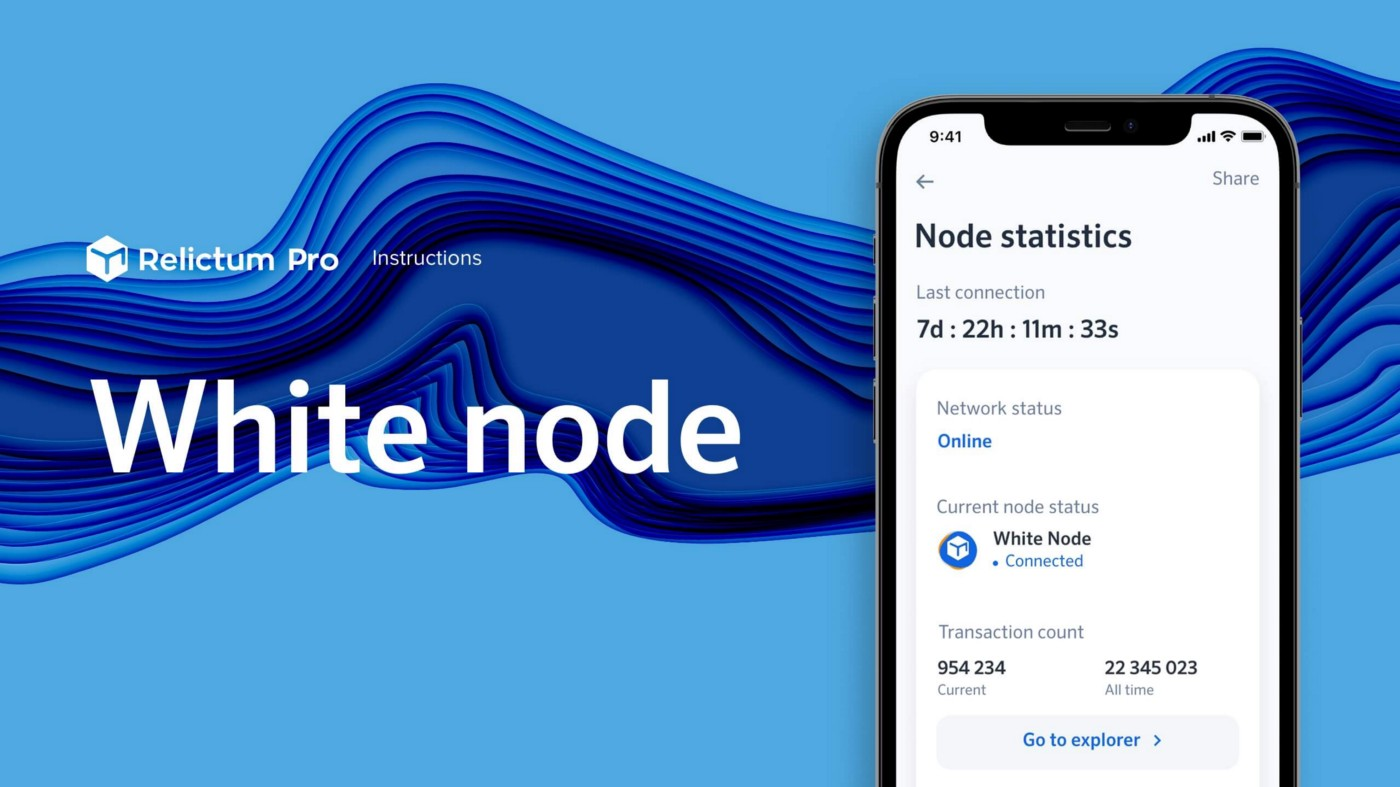
### Как запустить белую ноду
[Подробнее](/ru/faq/instrukcii/kak-zapustit-beluyu-nodu)
### Подключение платежного шлюза
[Подробнее](/ru/faq/instrukcii/podklyuchenie-platezhnogo-shlyuza)
### Инструкции по установке Relictum Node в Linux
Подробнее
# Как установить ноду Relictum Pro на MacOS?
1. Для начала вам необходимо скачать ноду. Перейдите на страницу [Скачать ноду](https://relictum.pro/) и в блоке **Нода для компьютеров** нажмите на кнопку **Скачать для MacOS**.
2\. После того как скачивание файла установки завершится, вам необходимо открыть файл \*.pkg.
**Внимание!** Стандартное открытие файла с помощью двойного клика приведет к выводу предупреждения о нехватке доступа для открытия данного файла, согласно стандартных настроек безопасности системы всех продуктов Apple.
3\. Для того что бы открыть файл и установить ноду на свой компьютер Mac, вы должны нажать на файл \*.pkg правой кнопкой мыши или тачпада, и выпадающем контекстном меню выбрать пункт “Открыть”. Это действие разрешает доступ для установки.
4\. Далее вам необходимо нажать на кнопку “Открыть” повторно.
5\. В процессе установки, система попросит разрешение на установку еще раз, в соответствии с процедурой политики безопасности Apple.
6\. Когда нода будет установлена вы увидите такое же системное подтверждение от MacOS.
7\. **Поздравляем**, программное обеспечение Relictum Pro было установлено на ваш компьютер Mac.
# Как создать аккаунт в ноде Relictum Pro на Mac OS?
1. Запустите ноду Relictum Pro из меню Launchpad или из раздела Application в Finder. Для удобства вы можете вынести иконку ноды в панель Docker.
2\. После первого запуска вы увидите ознакомительную информацию для работы с приложением, а для начала работы с нодой, вам необходимо будет ознакомится с правилами и подтвердить свое согласие с ними.
3\. Первым делом предстоит перевести ноду в основную сеть **MainNET** из тестовой. Для этого необходимо выбрать сеть mainnet в переключателе.
4\. После того, как нода подключится в основную сеть mainnet, вам предстоит создать аккаунт в приложении. Пролистайте экран ниже и нажмите кнопку **"Создать аккаунт"**.
5\. Используйте только настоящий e-mail и никому не сообщайте пароль от своего аккаунта.
6\. **Внимание!** Команда Relictum Pro настойчиво рекомендует вам сгенерировать закрытый приватный ключ для своего аккаунта, чтобы не потерять к нему доступ в дальнейшем. Просто нажмите кнопку Export private key.
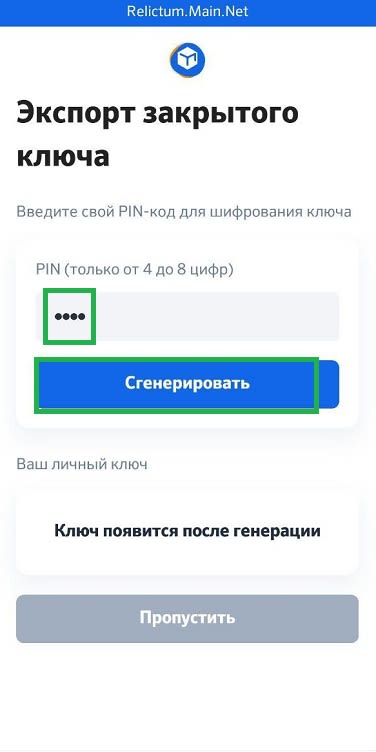
7\. Для генерации приватного ключа необходимо ввести PIN код (от 4 до 8 цифр) и нажать кнопку **"Сгенерировать"**.
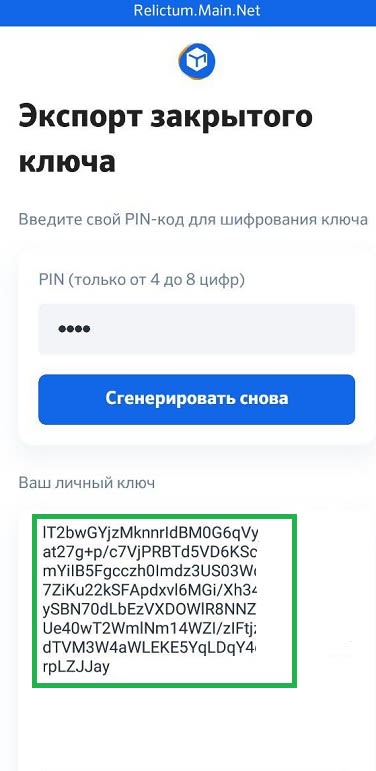
8\. Ваш приватный ключ будет сгенерирован, тут же. Вы можете сохранить его в файл или скопировать в надежное место.
**Внимание!** Не забудьте свой пинкод, иначе вы не сможете расшифровать приватный ключ при дальнейшем импорте.
9\. После сохранения своего PIN кода и приватного ключа в любом месте (или в файл), позаботьтесь об их дальнейшей анонимности.
10\. Вернитесь на главный экран приложения Relictum Pro и нажмите кнопку **“Войти”**.
11\. В списке аккаунтов выберите нужный, нажите кнопку **"Войти"** и введите пароль указанный при регистрации.
12\. **Поздравляем!** Вы успешно создали аккаунт Relictum Pro, авторизовались и подключили ноду к основной сети mainnet!
# Как скопировать кошелек Relictum Pro на Mac OS?
1. Откройте приложение Relictum Pro. Если у вас еще нет ноды Relictum Pro, [узнайте здесь](https://wiki.relictum.pro/faq#!how_to_install_node_ru) как её установить.
2. Далее, войдите в свой аккаунт. Если вы еще не создали ни одного аккаунта, [посмотрите здесь](https://wiki.relictum.pro/faq#!how_to_create_account_in_app) как создать аккаунт.
3. Перейдите в пункт меню **Crypto**.
4\. Выберите кошелек RLC.
5\. Нажмите кнопку **“Пополнить”**.
6\. Скопируйте адрес своего кошелька RLC.
7\. **Поздравлем!** Адрес кошелька RLC скопирован в буфер обмена вашей ОС. Теперь вы можете передать его кому-либо.
# Как создать аккаунт в ноде Relictum Pro на Android?
1. Скачиваем приложение [с сайта](https://relictum.pro/downloads/) или Play Market.
2. Открываем файл.
3. Устанавливаем приложение.
4. Внимательно читаем информацию, которую предлагает приложение к ознакомлению при первом запуске.
5. Читаем и подтверждаем путем проставления галочек условия и правила.
6\. Прокручиваем текст вниз и нажимаем на кнопку **«Начать работу».**
7\. Разрешаем приложению запуск в фоновом режиме.
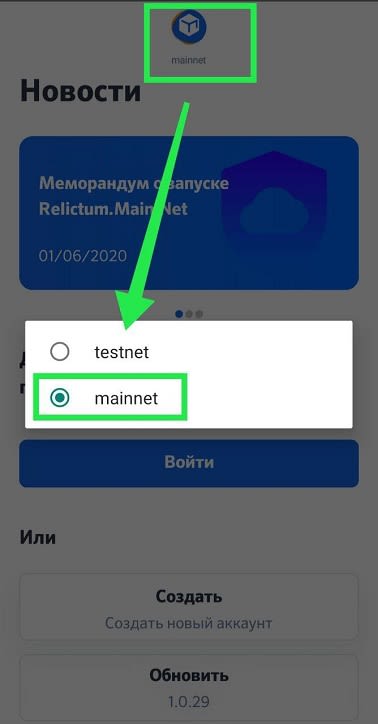
8\. Меняем тип сети с тестовой на основную. Для этого надо нажать вверху экрана на надпись **“testnet”** и выбрать **“mainnet”.**
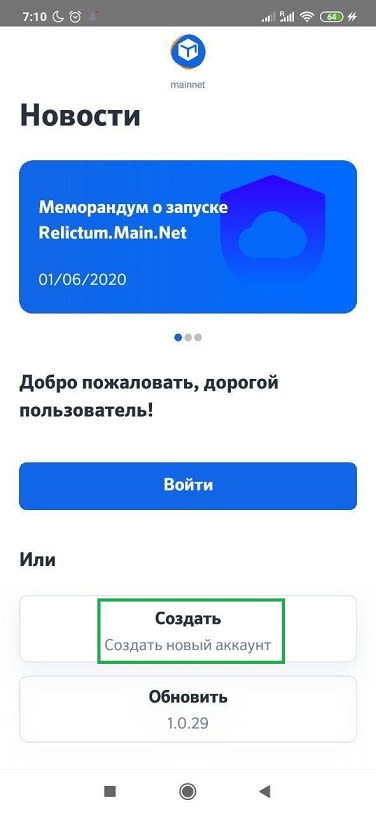
9\. Нажимаем кнопку **«Создать».**
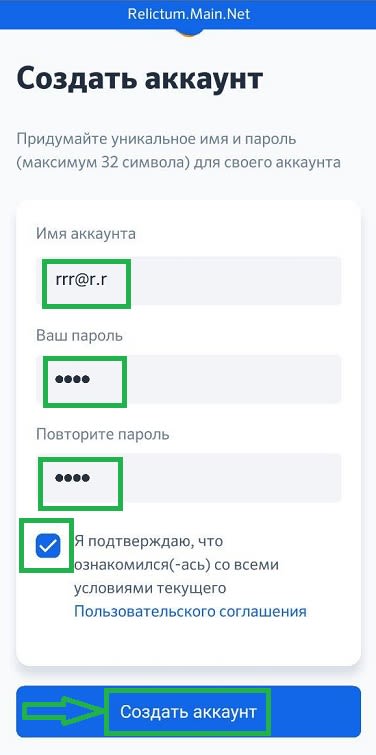
10\. Заполняем поля, читаем пользовательское соглашение и ставим галочку, подтверждая свое согласие со всеми условиями текущего Пользовательского соглашения и нажимаем кнопку **«Создать аккаунт».**
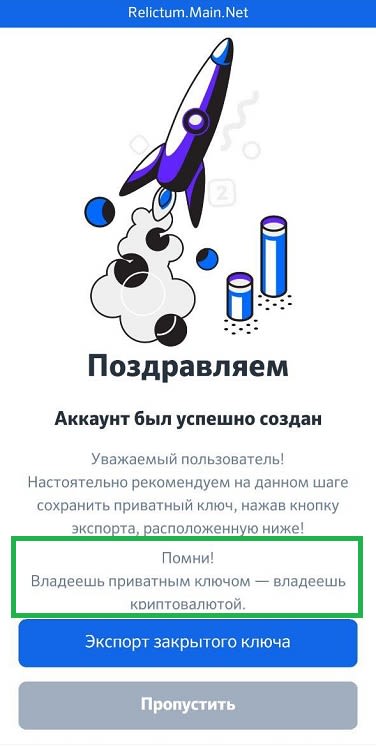
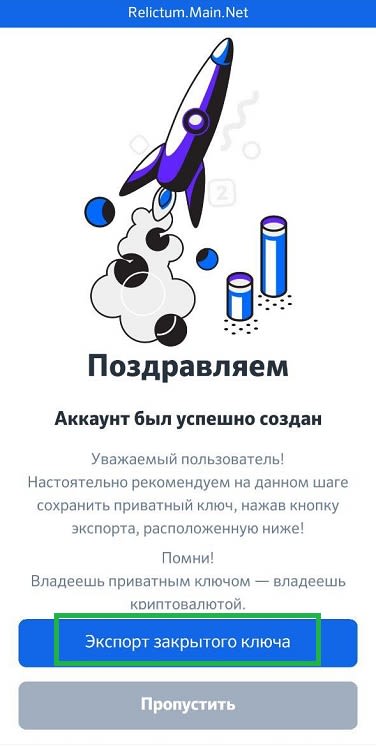
11\. **Аккаунт создан.** Делаем экспорт приватного ключа — нажимаем на кнопку «Экспорт закрытого ключа».
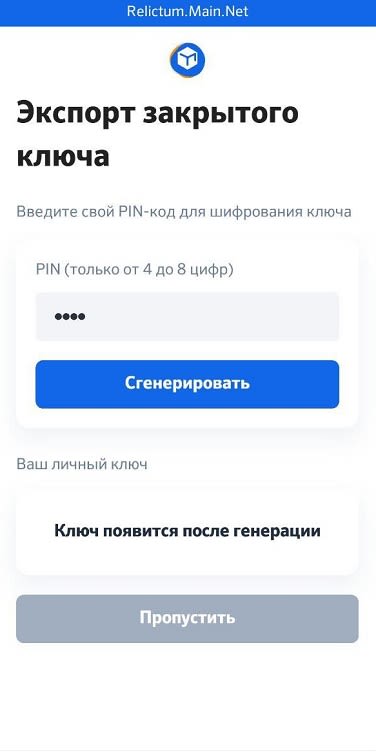
12\. придумываем и записываем ПИН. Вводим его в поле PIN и нажимаем на кнопку **«Сгенерировать».** Получаем ключ.
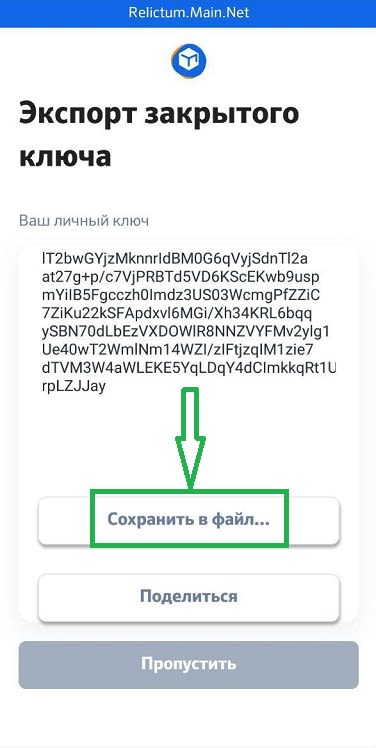
13\. Прокручиваем вниз и сохраняем ключ нажав на кнопку **«Сохранить в файл…».**
14\. После загрузки файла нажимаем 2 раза на кнопку «Пропустить» и попадаем в окно входа в аккаунт.
15\. Нажимаем на наш созданный аккаунт, вводим пароль и нажимаем на кнопку **«Войти».**
16\. **Поздравляем**, нода установлена и аккаунт создан!
# Как создать аккаунт в ноде Relictum Pro на Windows?
1. Скачиваем приложение [с сайта](https://wiki.relictum.pro/downloads).
2. Переносим файл из места загрузки в любое другое удобное для работы место. **Файл перенести обязательно.**
3. Открываем файл.
4. Устанавливаем приложение.
5. Внимательно читаем информацию, которую предлагает приложение к ознакомлению при первом запуске.
6. Читаем и подтверждаем, путем проставления галочек, Условия и Привила.
7\. Прокручиваем текст вниз и нажимаем на кнопку **«Начать работу»**.
8\. Меняем тип сети с тестовой на основную. Для этого надо нажать вверху экрана на надпись **“testnet”** и выбрать **“mainnet”**.
9\. Нажимаем кнопку **«Создать».**
10\. Заполняем поля, читаем пользовательское соглашение и ставим галочку, подтверждая свое согласие со всеми условиями текущего Пользовательского соглашения. И нажимаем кнопку **«Создать аккаунт».**
11\. **Аккаунт создан.** Делаем экспорт приватного ключа — нажимаем на кнопку **«Экспорт закрытого ключа».**
12\. Придумываем и записываем ПИН. Вводим его в поле PIN и нажимаем на кнопку **«Сгенерировать».** Получаем ключ.
13\. Прокручиваем вниз и сохраняем ключ нажав на кнопку **«Сохранить в файл…».**
14\. После загрузки файла нажимаем на кнопку **«Пропустить»** и попадаем в окно входа в аккаунт.
15\. Нажимаем на наш созданный аккаунт, вводим пароль и нажимаем на кнопку **«Войти».**
16\. **Поздравляем**, нода установлена и аккаунт создан!
# Импорт токенов GTN из личного кабинета в ноду
### ВНИМАНИЕ! Перед импортом токенов с личного кабинета в ноду удостоверьтесь, что вы сохранили приватный ключ от аккаунта ноды!
### Если ключ не сохранен, обязательно необходимо выгрузить и сохранить приватный ключ аккаунта, куда будете импортировать токены!
### Иначе, если утеряете доступ к этому аккаунту, после импорта токенов, потеряете полностью и окончательно доступ ко всем своим средствам на аккаунте. БЕЗВОЗВРАТНО!
### ВСЕ имеющиеся в личном кабинете токены будут отправлены на ноду. После импорта Вы можете распределить свои токены между несколькими аккаунтами, отправив их на различные кошельки внутри экосистемы RelictumPro.
### Приобретая токены GTN после импорта, процедуру импорта новоприобретенных токенов на ноду надо будет повторить.
### **Порядок действий для импорта токенов GTN:**
### **1. Запускаете ноду и выбираете майннет.**
### **2. Заходите в существующий аккаунт.**
### **3. Переходите на главную вкладку и нажимаете кнопку "Import"**
### **4. Откроется окно, к котором надо нажать кнопку "Перейти к импорту"**
### **5. В открывшейся вкладке необходимо ввести данные от аккаунта на сайте:**
Имя аккаунта - Ваш эмейл, на который зарегистрирован аккаунт (кабинет) на сайте
Ваш пароль - пароль от кабинета на сайте
two factore code - код из двухфакторной идентификации
И нажимаете кнопку "Авторизация"
### **6. В открывшемся окне Вы увидите общее количество токенов на вашем балансе.**
Нажимаете "Импортировать GTN"
### **7. Читаете правила импорта токенов GTN, Политику Импорта и Перезачета токенов, ставите галочки, подтверждая прочтение и согласие с условиями в полной мере, и нажимаете на кнопку "Подтверждаю согласие"**
### **8. Нажимаете кнопку "Продолжить"**
Процедура импорта GTN в Relictum.Main.Net будет проходить в полуавтоматическом режиме, и состоять из двух частей, в первой части участнику потребуется сформировать запрос на импорт GTN в ноде, во второй части, команда Relictum Pro, произведет проверку сформированной заявки, после чего подтвердит ее, и отправит запрос, к ноде владельцу GTN, для совершения транзакции на перевод, запрашиваемому аккаунту
Как только команда подтвердит, токены появятся на балансе.
**Поздравляем!**
**Ваши токены успешно импортированы и ожидают подтверждения перевода администратором.**
**Узнать статус транзакции вы можете в личном кабинете (**[**https://relictum.pro/cabinet/transactions**](https://relictum.pro/cabinet/transactions)**)**
### СОХРАНИТЕ СВОЙ ПРИВАТНЫЙ КЛЮЧ!
# Обновление ноды для перехода в Main.Net
**Мы перешли на 2 стадию запуска Main.Net. Эта стадия состоит из нескольких этапов.**
**Для перевода ноды в Main.Net необходимо провести обновление СТРОГО по инструкции ниже:**
1. Запускаем приложение.
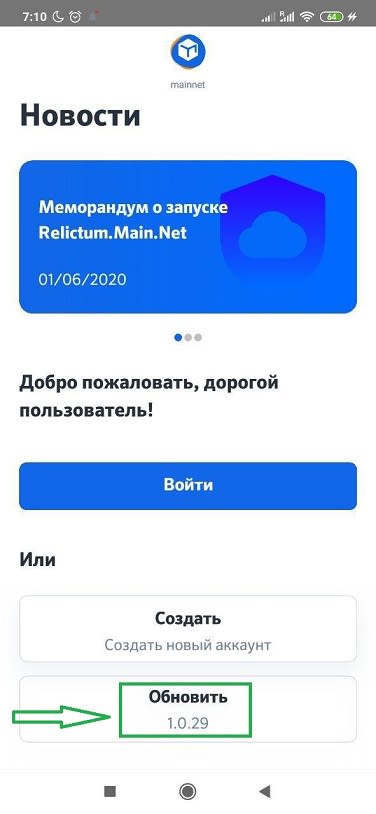
2. Жмём кнопку "обновить".
3\. Обновляем приложение.
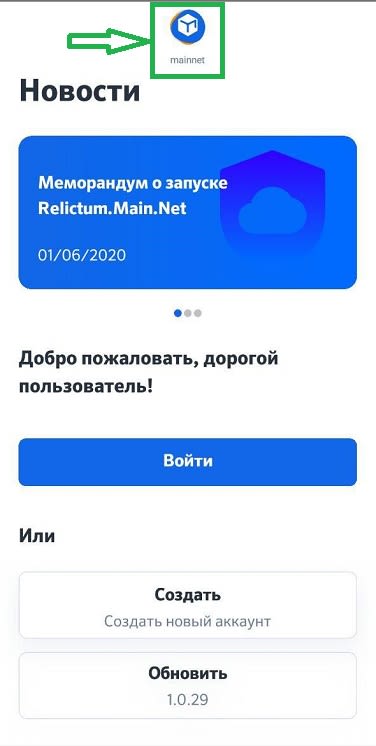
4\. Нажимаем на логотип надпись черного цвета на первом экране relictum pro.
5\. Выбираем mainnet.
6\. Жмём "регистрация".
7\. На следующем экране вводим логин в указанном ( ххх@х.х) формате по образцу.
8\. Дважды вводим пароль.
9\. Подтверждаем, что ознакомились с условиями.
10\. Ставим галочку.
11\. Жмём "Создать аккаунт"
Аккаунт создан:
12\. !Внимание! На следующем этапе (!) Жмём кнопку синего цвета (!) "Сохранить копию приватного ключа".
13\. Видим следующее окно:
14\. Прежде чем экспортировать приватный ключ, мы должны придумать ПИН код, стоящий из 4-8 цифр.
15\. Вводим ПИН код.
16\. Жмём синию кнопку "Сгенерировать"
17\. Приватный ключ выгружается в текстовом виде. Ниже кнопки видим данные секретного ключа.
18\. прокручиваем вниз и жмём кнопку "Сохранить в файл".
19\. Сохраняем файл export.pk
Приватный ключ сохранен.
**20. Помните! Ваш приватный ключ - доступ к вашим средствам. Никто кроме вас за них не несёт ответственность!**
21\. ВНИМАНИЕ! Ключ ОДНОРАЗОВЫЙ! Каждый раз, использовав ключ для доступа к ноде (импортировав ключ для получения доступа), делайте ЭКСПОРТ нового ключа и сохраняйте его!
22\. Нажимаем кнопку «Назад» и возвращаемся в окно входа в аккаунт.
23\. Выбираем аккаунт, вводим пароль.
**ПОЗДРАВЛЯЕМ! ВЫ В MAIN.NET!**
# Как запустить белую ноду
### Домашняя белая нода
### Минимальные требования:
1. OS Windows 10, Windows Server 2012 R2 Standatrd/Datacenter, Windows Server 2016, Windows Server 2019.
2. Статический ip-адрес от вашего провайдера.
3. Требования к компьютеру:
3.1. Минимальные характеристики:
* CPU: Intel Core i3 or higher.
* Сеть: 25 Mbit/s or higher.
* RAM: 4 GB DDR4 or higher.
* HDD № 1: 1x120GB SSD for operating system Windows.
* HDD № 2: 1x1000GB HDD or SSD for storage or higher.
* Брандмауэр Windows можно включить с настройками по умолчанию, никаких дополнительных настроек не требуется.
3.2. Средние характеристики:
* CPU: Intel Core i5.
* Сеть: 50 Mbit/s or higher.
* RAM: 8 GB DDR4 or higher.
* HDD № 1: 1x120GB SSD for operating system Windows.
* HDD № 2: 1x1000GB HDD or SSD for storage or higher.
* Брандмауэр Windows можно включить с настройками по умолчанию, никаких дополнительных настроек не требуется.
3.3. Рекомендуемые характеристики:
* CPU: Intel Core i7.
* Сеть: 100 Mbit/s or higher.
* RAM: 16 GB DDR4 or higher.
* HDD № 1: 1x120GB SSD for operating system Windows.
* HDD № 2: 1x1000GB HDD or SSD for storage or higher.
* Брандмауэр Windows можно включить с настройками по умолчанию, никаких дополнительных настроек не требуется.
### Инструкция по запуску белой ноды в домашних условиях:
1. [Скачать файлы](https://drive.google.com/file/d/1TTPO8cwC2U-YVQnfkbugg97a-MPhLoQr/view)
2. Убедитесь, что ваш компьютер подключен к соответствующему маршрутизатору соответствующего провайдера.
3. На сайте проверьте, совпадает ли указанный на сайте ip-адрес с тем, который вам предоставил провайдер.
4. Обновите ноду до последней версии программы и запустите программу (ноду).
5. В папке с именем вашего каталога \ networks \ mainnet удалите папку data-storage.
6. Поместите файл .config с вашим IP адресом в папку \ networks \ mainnet. Файл должен иметь расширение “config”. Если вдруг расширение этого файла не .config, то вам необходимо установить приложение Total Commander и использовать его для переименования файла.
7. Чтобы отредактировать файл .config, и ввести свой IP-адрес вместо того, что записано в файле .example\_config, вы можете использовать, например, программу Notepad++, которая прилагается к инструкциям.
8. Запустите узел и заново создайте хранилище в узле. Переходим во вкладку настройки и смотрим статус ноды, если статус “белая” вы сделали все верно. Поздравляем! Теперь у вас белая нода!
### Серверная белая нода
### Требования:
1. OS Windows 10, Windows Server 2012 R2 Standatrd/Datacenter, Windows Server 2016, Windows Server 2019.
2. Статический IP-адрес вашего дата-центра.
3. Требования к серверу:
* RAM — 16 Gig or higher.
* CPU — Intel Xeon E3–1270v2 higher.
* Место хранения: 1x 120GB SSD single.
* Место хранения: 1x 1TB SSD or higher.
* Сеть — 1Gbit/s.
* Брандмауэр Windows можно включить с настройками по умолчанию, никаких дополнительных настроек не требуется.
### Инструкция по запуску белой ноды на сервере:
1. [Скачать файлы](https://drive.google.com/file/d/1TTPO8cwC2U-YVQnfkbugg97a-MPhLoQr/view?usp=sharing)
2. Убедитесь, что ваш компьютер подключен к соответствующему маршрутизатору соответствующего провайдера.
3. На сайте проверьте, совпадает ли указанный на сайте ip-адрес с тем, который вам предоставил провайдер.
4. Обновите ноду до последней версии программы и запустите программу (ноду).
5. В папке с именем вашего каталога \ networks \ mainnet удалите папку data-storage.
6. Поместите файл .config с вашим IP адресом в папку \ networks \ mainnet. Файл должен иметь расширение “config”. Если вдруг расширение этого файла не .config, то вам необходимо установить приложение Total Commander и использовать его для переименования файла.
7. Чтобы отредактировать файл .config, и ввести свой IP-адрес вместо того, что записано в файле .example\_config, вы можете использовать, например, программу Notepad++, которая прилагается к инструкциям.
8. Запустите узел и заново создайте хранилище в узле. Переходим во вкладку настройки и смотрим статус ноды, если статус “белая” вы сделали все верно. Поздравляем! Теперь у вас белая нода!
### FAQ
#### 1. Мой статический IP-адрес изменился, что мне делать?
Вы должны остановить приложение (ноду) и записать адрес нового типа в файл .config. В папке с именем вашего каталога \ networks \ mainnet удалите папку для хранения данных. Запустите ноду и заново создайте хранилище в приложении.
#### 2. Как я могу определить белый ли адрес у ноды?
Нода имеет индикатор, который сигнализирует вам об этом.
\#white #node #whitenode
# Подключение платежного шлюза
Для организации приема платежей через Relictum Pay необходимы следующие атрибуты:
1. Белая нода.
2. Ключи шифрования.
3. Relictum PHP SDK.
4. Платежный контракт, зарегистрированный в белой ноде.
## 1. Белая нода
Белая нода - это нода с публичным IP-адресом, с помощью которого можно организовать любой собственный домашний сервер для публикации в сети Интернет.
По ссылке на Medium вы можете найти [инструкцию по установке белой ноды](/ru/faq/instrukcii/kak-zapustit-beluyu-nodu).
## 2. Ключи шифрования
Следующий шаг - нужно сгенерировать ключи доступа для авторизации на ноде при выполнении запросов на выставление счетов и переводов активов.
В консоли поочередно введите следующие команды:
```
openssl genrsa - out private .key 2048
```
```
openssl rsa - in private . key -pubout -out key .pub
```
Пошаговая инструкция ниже:
#### Шаг 1. Ввод первой команды
#### Шаг 2. Результат
#### Шаг 3. Ввод второй команды
#### Шаг 4. Результат
В результате вышеуказанных действий будут сгенерированы ключи. В папке это будет выглядеть таким образом:
Для выставления счетов через RelictumPay необходимо переименовать файл key.pub таким образом, чтобы его название соответствовало URI вашего контракта. Название должно быть без "system://" и включать символ "-" в качестве разделителя. Перенесите его в директорию (корень) ноды.
Пример: ваш контракт system://payments/mycontract - в этом случае файл (ключ) должен называться payments-mycontract.pub .
Организация выплат с ноды:
* Для отправки токенов $GTN файл key.pub необходимо переименовать в transfer.pub .
* Для отправки любых других токенов файл key.pub необходимо переименовать в transfer2.pub .
Пример, как выглядит папка с нодой с файлами:
При авторизации запроса направлять вместе с данными также файл .key , который соответствует своей паре ключа .pub .
Еще один вариант, как создать счёт на оплату для клиента через смарт-контракт на языке php с использованием нашего SDK:
Результат на скриншоте ниже:
## 3. Relictum PHP SDK
Если вы используете PHP в своем проекте, то SDK поможет вам в организации этого процесса.
Установка. Введите команду в консоли:
```
composer require relictumblockchain/rphpsdk
```
Если вы используете версии PHP8 и выше, то необходимо добавить флажок отключения проверки версий, так как в противном случае произойдет ошибка при установке:
```
--ignore-platform-req=php
```
Вы также можете делать запросы и на других языках или другими способами. Описанная выше последовательность работает для PHP.
По ссылке [пример готовой ноды](https://mega.nz/file/8lMngIzI#oiMIBU2cb4Nl9ST_VUOgPprxEM-AffQhG3NhjpQeR0A) с подключенным платежным контрактом и подробным примером скриптов на PHP.
## 4. Регистрация платежного контракта в белой ноде:
1. Зайдите в раздел Продукты -> Платежный контракт -> Добавить контракт.
2. Заполните следующие поля:
* Системное имя контракта: любое название на латинице в нижнем регистре, желательно одним словом.
* Поставщик - выберите любое название, желательно короткое - его будет видно в разделе RelictumPay как объект, который выставил счет на оплату. Если название поставщика будет длинным, то оно будет переноситься построчно, поэтому желательно использовать короткое).
Результат на скриншоте:

3. При сохранении и создании платежного контракта с вас спишется 50 USDR.
Выглядит это таким образом:
Пример отправки запроса через консоль:
```
[ 'base_uri' => 'http://127.0.0.1/api/' ],
'authorization' => $authorizationHelper
]);
// Create a new request
$request = new Relictum\RPHPSDK\Request($configurator);
try {
// Create a new payment invoice
$id = 10 ; // Payment id (any number, unique for this
contract)
$contract = 'mycontract' ; // Contract alias
$relictum = 100 ; // The account of the user to whom the
invoice is being issued
$myaddress = 1 ; // The account to which the tokens will be
transferred after payment
$response = $request->doPaymentCreate($contract, [ 'data' => [
'payment' => $id,
'accountfrom' => $relictum, // or addressfrom for use
relictum address instead of id
'accountto' => $myaddress, // or addressto for use
relictum address instead of id
'token' => 'usdr' ,
'amount' => 200
]]);
}
catch (Relictum\RPHPSDK\Exceptions\NodeRequestException $e) {
// Catch exception and output error data
var_dump($e);
}
// Output node response
var_dump($response);
```
# Ответы на вопросы
### Запуск RELICTUM PRO - TESTNET с доступом для Android устройств
### Базовая концепция Relictum PRO
Основополагающей концепцией компании RELICTUM PRO является создание безопасной, высокопроизводительный экосистемы децентрализованных приложений (смарт-контрактов) созданных как компанией RELICTUM PRO так, и динамических - разработанных сообществом, для обеспечения прозрачной и свободной работы внутри разных областей экономики государства, предприятия или публичного сервиса.
В общем виде экосистему можно разделить на три основополагающих уровня:
Уровень №1 - это сеть распределенных узлов (нод) независимых от типа устройства, связываемых посредством инновационного типа консенсуса (Proof Of Tsar) с распределенным хранилищем и сверх быстрой и безопасной криптографией.
Уровень №2 - это высокопроизводительные и безопасные децентрализованные смарт-контракты, ведущие хозяйственную деятельность в стабильной криптовалюте.
Уровень №3 - это приложения для различных платформ, под управлением самых популярных операционных систем таких как windows, mac os x, ios, android и пр; Интерфейсы для интеграции с различными существующими системами; обучающие материалы и прочие инструменты для развития и популяризации доступа к экосистеме.
### Условия и порядок доступа к RELICTUM PRO TESTNET
Важным этапом на пути любой технологический компании является период запуска продукта в тестовом режиме с возможностью доступа для аудитории, нацеленной на знакомство с продуктом, исследование всех его возможностей, а также выявление недочетов и различных неточностей.
Этот период всегда проходит в несколько этапов, главной целью которых является проверка работоспособности всех узлов системы на большом количество пользователей, получение обратной связи от первых пользователей обо всех неточностях и мелких недоработках.
### Запуск RELICTUM PRO TESTNET будет проведен в несколько фаз, этапов.
1. На первом этапе, для проверки работоспособности всех узлов сети и других важных компонентов будет предоставлен ограниченный доступ к сети через мобильное приложение на базе платформы Android, всем зарегистрированным пользователям, которые приобрели токены GTN.
2. На втором этапе, будут постепенно добавлены приложения для остальных платформ, таких как: windows, ios и mac os x, уже сейчас проходящих стадию отладки и готовящихся к выпуску.
3. На третьем этапе, после проверки всеми уже зарегистрированным и приобретшими GTN токены пользователями будет расширен доступ для более широкой аудитории, а так же будут добавлены внедрены изменения, улучшения исправления найденные при работе приложения ранее.
### Инструкция по скачиванию и установке приложения на базе Android
В связи с тем, что платформа Android является более дружественной для установки и запуска приложений выполняющих сложные операции внутри операционной системы, которыми могут считать работа с сетью, работа с оперативной памятью, сложными вычислениями и пр.
Команда проекта сделала акцент на первом этапе именно на эту платформу, тем более что установка приложения .APK возможна без предварительной регистрации приложения в PlayMarket от Google, что, в свою очередь, является не самым идеальным сценарием для распространения продукта, но на этапе запуска тестнета допустимо, при условии того, что приложении на базе Android от компании Relictum PRO уже проходит регистрацию и проверку в PlayMarket от Google.
Инструкция по установке на первом этап:
1. Зарегистрироваться на сайте Relictum PRO.
2. Приобрести токенов GTN на сумму не менее 1$.
3. Перейти на страницу сайта компании [Relictum.pro](https://relictum.pro/downloads) для скачивания файла под платформу Android (Это действие необходимо выполнить на мобильном устройстве)
4. Скачать и установить приложение на своем устройстве.
5. Перейти на экран регистрации, указать свой email, использованный при регистрации на сайте, указать свой пароль и создать учетную запись.
Важно:
После установки приложения и регистрации, система создаст специальный файл с приватными ключами у вас на устройстве, что будет подразумевать возможность доступа к экосистеме только с вашего устройства с данными приватными ключами.
В случае потери данных, переустановке системы, или передаче данных для доступа другому пользователю войти в систему с указанного email будет невозможно, необходимо будет делать новую регистрацию, а так как на первом этапе доступ разрешен только ограниченного круга, то нужно будет писать в техническую поддержку.
### Что такое Relictum Pro?
**Relictum Pro** — это бесконечный распределенный реестр с развитой системой смарт-контрактов, описывающий (формализующий) любое событие в жизнедеятельности человека, начиная от купли-продажи товаров и услуг, учета kогистических событий, заканчивая отслеживанием авторских прав и взаимодействие с юридическими лицами, и включающий в себя, ряд самоисполняемых сделок (смарт-контрактов) в любой сфере деятельности.
**Relictum Pr o** самоорганизующаяся, саморазвивающаяся сеть, что выражается в постоянном саморанжировании нод по нескольким критериям, с присвоением каждой коэффициента надежности в системе.
**Relictum Pro** обладает несколькими главными особенностями:
* Смарт-контракты используются для формализации любых видов деятельности, где происходит какое-либо событие;
* Смарт-контракт самостоятельно отслеживает, были ли в полной мере исполнены те или иные условия контракта. При этом, благодаря самой системе Relictum Pro, код абсолютно защищен от любого стороннего вмешательства;
* То есть, ни один злоумышленник не сможет изменить исходный код смарт-контракта, заключенного между двумя (или более) нодами;
* Это возможность проводить операции с разными типами и видами смарт-контрактов;
* Возможность генерации новых смарт-контрактов с новыми типосвойствами или свойство-типами;
* В нашей системе может быть заключен смарт-контракт одновременно между 10 контрагентами;
* Вес (размер) одного блока в Relictum Pro — порядка 120 байт, что в 8000 раз меньше, в сравнении с блоком Биткойна.
**Relictum Pro** — масштабируемый, гиперсовременный блокчейн, с расчетом на дальнее будущее, продукт, который может быть использован при более мощных процессорах, при новейших электронных и компьютерных технологиях, в том числе оптических и квантовых компьютерах.
### Что такое смарт-контракт?
Cамоисполняемые сделки с мгновенным доступом.
### В какой сфере деятельности можно использовать Relictum Pro?
Relictum Pro — это бесконечный распределенный реестр с развитой системой смарт-контрактов, описывающий (формализующий) любое событие в жизнедеятельности человека, начиная от купли-продажи товаров и услуг, учета логистических событий, заканчивая отслеживанием авторских прав и взаимодействие с юридическими лицами, и включающий в себя, ряд самоисполняемых сделок (смарт-контрактов) в любой сфере деятельности.
Relictum Pro – это полноценная блокчейн-платформа, предназначенная для государственных, коммерческих и частных видов деятельности.
### Что такое нода?
Ноды это узлы сети, тела нод полностью идентичны и представляют собой бинарный файл с возможностью подгрузки и управления реестром.
Все ноды идентичные. Каждая нода при инициации определяет сама себя и к какой группе она относится (как опция, выбирается владельцем ноды вручную).
Полноценные ноды — бинарные исполняемые файлы, которые могут автоматически инициализироваться в Мастер-ноду, Лайт-ноду, Приват-ноду, Слип-ноду, Облачную ноду.
Нода является, в том числе, и портфелем, в который входит:
* Возможность создания собственного ICO;
* Возможность создания своей биржи;
* Возможность создания собственной валюты (смарт-контракт коинов, смарт-контракт майнера).
### Что такое Блокчейн?
Это выстроенная по определённым правилам непрерывная последовательная цепочка блоков (связный список), где каждый следующий блок имеет хеш предыдущего блока.
Это глобальный, масштабный распределенный реестр, работающий с миллионом компьютеров и доступный каждому. Любые ценности, от денег до музыки, могли бы храниться, перемещаться, обмениваться и управляться без могущественных посредников (таких как банки, корпорации, вплоть до государства). Информация распределена по глобальному реестру. Когда люди могут повсеместно доверять друг другу и сотрудничать на равных. И доверие основывается не на авторитете организации, а на сотрудничестве, криптографии и умном коде.
### Почему Relictum Pro?
Relictum Pro — это Blockchain 5.0, новая сеть, которая будет включать в себя все предыдущие функции blockchain наряду с революционными новшествами.
### Что такое тип сети P2P?
Существующие системы, на данный момент, используют тип сети P2P, на котором строятся не только передача сообщений, но и хранение фрагментов файлов — распределённые хранилища (на базе коммутации пакетов (Интернет), что подразумевает подтверждения доставки, ненужные заголовки в теле пакета, а также использует мощности центрального процессора на сборку фрагментов. P2P использовалась для передачи файлов для файлообменников. Файлообменники были необходимы, чтобы была возможность скачивать фильмы, программы и документы. Один узел соединяется с несколькими и по частям скачивает данные с других узлов. Таким образом, скорость скачивания приближалась к максимальному значению сетевой карты и скорости провайдера.
### Протокол TCP/IP
В блокчейн-платформе Relictum Pro используется уникальный протокол, в основе которого лежит протокол TCP/IP, в котором виртуальный канал связи с каждой нодой образуется поверх сети Интернет.
Преимущества данной сети в ее надежной устойчивости и изолированности от общего сегмента сети Интернет. В этом виртуальном канале передается только информация Relictum Pro, что в несколько раз увеличивает скорость передачи данных.
### Какой механизм организации Proof of Tsar?
Каждые 0.5 сек происходит регенерация сети (перекоммутация всех узлов), наподобие регенерации оперативной памяти ЭВМ, во главе с одной главной нодой – «Царем» и стоящими под ним «Генералами», которые собирают транзакции и передают их «Царю» для обработки. После этого «Царем» раздаются блоки «Генералам», а они раздают дальше всем по цепочке. «Царь» и «Генералы» выбираются автоматически и постоянно меняются.
«Генералом» и «Царем» может быть любая нода. Но «Царь», в следующую генерацию, после регенерации сети, уже не может быть ни «Царем» ни «Генералом». Как и “Генерал”, в свою очередь, не может быть генералом два раза подряд.
Видео "Relictum Pro Модель консенсуса Proof of Tsar | Blockchain 5.0 Of the Latest Generation" :
### Что такое Master\_Chain?
MasterChain- главная цепочка блоков в которой записывается только хеш какого-либо блока из нижестоящих и боковых смарт-контрактов. Параллельно с главным Master Chain формируются различные независимые цепочки — это смарт-контракты, которые организуют трехмерное распределение.
### Что такое распределенное хранилище?
Распределенное хранилище не требует подтверждения получения данных. Благодаря организации различных цепочек смарт-контрактов ускоряется поиск раздробленных файлов и их просмотр. По эмпирическим данным, скорость скачивания существенно быстрее P2Р сети.
### Как работает биометрическое распознавания лица:
Берется хеш лица, совместно с SecureCall — подтверждение транзакции при помощи звонка на телефон. Во время вызова вводится пароль, используя DTMF сигнал совместно со следующими решениями:
* После удачной транзакции приватный ключ теряет актуальность, а клиент неизбежно обязан генерировать новый ключ (или это делается автоматически);
* В цепочку смарт-контракта записывается публичный хеш от хеша конкатенации \[Token + pass phrase] или \[Token + random text] в бинарном виде;
* Предусмотрена возможность использования 2-х коротких ключей с последовательной проверкой. После проверки 1-го ключа (независимо от результата проверки) предлагается ввод второго ключа. Механизм предполагает после 1-й проверки выдать строку, которая является хешем 2-го ключа, а значит хакеру понадобится подбирать 2-й ключ, не зная вообще, верный ли хеш 1-го ключа. Для исключения взлома предусмотрена возможность ограничения количества попыток.
### Чем отличается Relictum Pro от конкурентов?
Relictum Pro, на данный момент, невозможно сравнить с существующими проектами. В Relictum Pro нет понятия "сравнение с конкурентами", так как, помня о проблемах современной организации сети, в предоставленном нами способе коммуникации HyperNet — нигде не используется.
стр. 43
### Что такое токеномика?
Набор экономических правил и моделей, обеспечивающих функционирование экономики проекта, базирующегося на токенах.
### Что такое генезис токены?
Генезис токены — это токены, выражающие имущественное право на интеллектуальную собственность (IP) программного кода Relictum Pro сети, эмитированные в размере 10 000 000 000 GTN и распределяются в процессе соответствующих раундов STO среди ранних инвесторов, поверивших в математически обоснованную концепцию Relictum Pro.
### Что такое обернутые монеты?
Обернутые монеты – это цифровые активы, эмиссия которых зависит от полученных на кошельки Relictum Pro электронных или цифровых валют, цифровых активов или криптовалют.
Наименование обернутых монет в Relictum Pro для удобства пользователей будет сохраняться. Например, USDT – это USDTR, BTC – это RBTC и т.д.
### Какие сервисы предоставляет сеть Relictum Pro?
* Персональный цифровой сейф.Данный сервис позволит владельцу узла сохранять секретные данные, такие как пароли, переписка в социальных сетях, персональные данные и прочее.Персональный цифровой сейф устроен так, что данные недоступны никому, кроме самого владельца узла.И даже для разработчиков они недоступны.
* Сервис доступа к децентрализованным оракульным данным. Таким как точное время, курсы валют и т.д.
* Сервис доступа к децентрализованному генератору случайных чисел. Генератор случайных чисел на основе реликтового излучения. Идеальный источник энтропии.
* Сервис конструирования смарт-контрактов. С помощью которого вы сможете гибко настраивать свои процессы или просто выпустить свой стейбл токен.
### Что такое распределенное хранилище?
Благодаря организации различных цепочек смарт-контрактов ускоряется поиск раздробленных файлов и их просмотр. По эмпирическим данным, скорость скачивания существенно быстрее P2Р сети.
Скорость доступа — Моментальный доступ.
Период хранения — Пожизненно.
Защита информации: Использование смарт-контракта — “Авторское право”.
Надежность — Абсолютная децентрализация.
Среда использования: Вся хозяйственная жизнедеятельность человека.
### Стоимость транзакции в сети Relictum Pro?
Relictum Pro сеть — это блокчейн сеть нового поколения, в которой можно проводить транзакции с любой электронной или цифровой валютой, цифровыми активами, криптовалютами, стоимость которой самая низкая в мире — 0%!
### Существует ли у Relictum Pro реферальная программа?
На протяжении всего строительства блокчейн-сети мы предлагаем еще одну программу — «Вознаграждение за друзей». Ты рекомендуешь другу установить наш кошелек, на который мы выплатим вознаграждение за подключение, а тебе за твои усилия мы зачислим 750 GTN, что по текущему курсу составляет 3.00 $.
### Что означает гипернет?
Гипернет дает постоянное устойчивое соединение между всеми нодами на маленький ограниченный промежуток времени (от 0.5 до 10 с), в зависимости от нагрузки сети.
### Какая скорость транзакций в секунду в сети Relictum Pro?
100,000 транзакций в секунду, реальная скорость, достигнутая на данный момент — По результатам \_Testnet.
1,000,000 транзакций в секунду, расчетная величина производительности, когда транзакции не только уходят в сеть, но и возвращаясь, записывают блоки в каждую ноду.
### Что делать если утрачены приватные ключи?
Если вы утратили доступ к приватным ключам, вы уже не сможете воcстановить доступ к аккаунту. Ни у кого кроме вас нет копии приватного ключа.
### Сколько хранятся данные в системе Relictum Pro?
Хранение любых оцифрованных документов и набора данных, файлов в любом объеме с мгновенным доступом к любой хранящейся информации.
Распределенные данные остаются пожизненно в системе, в отличие от какого-либо хостинга.
### Что такое роялти?
Роялти – это постоянный пассивный доход держателей токенов GTN.
Роялти формируется за счет дохода блокчейна RelictumPro. Каждый месяц 1 и 15 числа 19% от доходов сети блокчейна RelictumPro распределяется среди держателей токенов GTN пропорционально количеству токенов. В получении роялти участвую только те токены, которые находятся в блокчейне (в ноде).
Роялти накапливается на аккаунте и в любой момент можно посмотреть актуальный баланс.
# РАЗРАБОТКА / ИНТЕГРАЦИЯ
# API Relictum Finance
Relictum Finance API позволяет принимать платежи онлайн на вашем сайте. Мы поможем вам настроить ваше первое платежное соединение, чтобы получить возможность продавать и покупать USDR.
### Callback
Криптобанк отправит запрос на указанный вами url, когда статус созданной вами заявки изменится на успешно выполненную или отменённую.
[Подробнее](/ru/razrabotka-integraciya/api-relictum-finance/callback)
### Проверка пользователя
Данный запрос использовать не обязательно, но он позволит вам проверить корректность заполнения поля email, а также предоставлять конечному пользователю подсказку о заполнении поля relictum (если ему предоставляется такая возможность), в случае, когда данный email уже зарегистрирован в криптобанке.
[Подробнее](/ru/razrabotka-integraciya/api-relictum-finance/proverka-polzovatelya)
### Статус
Данный запрос использовать не обязательно, если вы корректно обрабатываете callback-запросы от криптобанка об обновлении статусов транзакций, но он позволяет в любой момент проверить актуальное состояние любой транзакции в криптобанке.
[Подробнее](/ru/razrabotka-integraciya/api-relictum-finance/status)
### Покупка
Запрос позволяет создать заявку покупки USDR за выбранную криптовалюту. Ответом является информация о созданной заявке, в том числе идентификатор созданной заявки ID, который вам необходимо сохранить.
[Подробнее](/ru/razrabotka-integraciya/api-relictum-finance/pokupka)
### Список доступных мерчантов
Запрос позволяет получить список доступных для вашего аккаунта платёжных шлюзов криптобанка, включая актуальную информацию о курсах и комиссиях.
[Подробнее](/ru/razrabotka-integraciya/api-relictum-finance/spisok-dostupnykh-merchantov)
# Callback
Криптобанк отправит запрос на указанный вами url, когда статус созданной вами заявки изменится на успешно выполненную или отменённую.
Пример ответа
```json
{
"currency": "USDT-TRX",
"id": "374",
"status": "SUCCESS",
"sum": "185",
"sum_currency": "186",
"verify_hash": "SECRET_HASH"
}
```
* id — идентификатор заявки в криптобанке, который вы сохранили после запроса на покупку.
* verify\_hash — подпись сообщения, которая позволит вам убедиться, что запрос поступил именно от криптобанка.
Обратите внимание, что сумма в USDR \ и сумма в валюте \ могут отличаться от значений, установленных при создании транзакции (например, если конечный пользователь перечислил сумму, отличающуюся от установленной).
Удостоверьтесь, что ваш код корректно обрабатывает значение каждого возвращаемого параметра.
Возможные значения поля status:
* SUCCESS — транзакция оплачена
* CANCEL — транзакция отменена
Проверка verify\_hash (пример на PHP):
```php
$data = $_POST;
unset($data['verify_hash']);
ksort($data);
$dataString = serialize($data);
$checkKey = hash_hmac('sha1', $dataString, CALLBACK_API_KEY);
if ($checkKey != $_POST[''verify_hash'']) {
return false;
}
```
Ожидаемый ответ, в случае успешной обработки события:
```json
{
"success": true
}
```
В случае иного ответа, криптобанк продолжит отправлять запрос до получения правильного ответа, либо до достижения лимита, установленного в настройках API.
# Проверка пользователя
Данный запрос использовать не обязательно, но он позволит вам проверить корректность заполнения поля email, а также предоставлять конечному пользователю подсказку о заполнении поля relictum (если ему предоставляется такая возможность), в случае, когда данный email уже зарегистрирован в криптобанке.
Пример ответа
```json
GET https://relictum.finance/api/v1/user/get-relictum?email=
Content-Type: application/json
{
"success": true,
"relictum" null
}
```
* \ — email-адрес конечного пользователя.
# Статус
Данный запрос использовать не обязательно, если вы корректно обрабатываете callback-запросы от криптобанка об обновлении статусов транзакций, но он позволяет в любой момент проверить актуальное состояние любой транзакции в криптобанке.
Пример ответа
```json
GET
https://relictum.finance/api/v1/finance/status?id=
Content-Type: application/json
// example
https://relictum.finance/api/v1/finance/status?id=374
Ответ:
{
"success":true,
"transaction":{
"id":374,
"sum":200,
"sum_currency":201,
"status":0,
"gate":{
"title":"USDT Tron",
"alias":"usdt-tron",
"min_sum":10,
"max_sum":100000,
"rate":1,
"gateCurrency":{
"code":"USDT-TRX",
"title":"Tether Tron TRC-20",
"type":"crypto"
},
"data":{
"send_paysys_identificator":"USDTTRC",
"dec_digits":4,
"icon":"https://dev.relictum.finance/img/gate/usdttrc20.svg",
"networks":[
"TRC20"
],
"percent_fee":0,
"min_fee":1
}
},
"user":{
"username":"test@relictum.finance",
"email":"test@relictum.finance"
},
"created_at":"2021-08-16 16:30:48",
"updated_at":"2021-08-16 16:30:48",
"transaction_address":"TNhVvX9Tjmmu19MaL77bEYs7TxqPkczVM4",
"data":{
"relictum":"relictum_recipient_wallet_address",
"course":1,
"percent_fee":0,
"min_fee":1,
"fee":1
}
}
}
```
* \ — идентификатор заявки в криптобанке.
Возможные значения поля status:
* 0 – Новая транзакция
* 1 – Транзакция оплачена
* 2 – Транзакция отменена
* 3 – Транзакция ожидает модерации
* 5 – Возникла ошибка при обработке транзакции
# Покупка
Запрос позволяет создать заявку покупки USDR за выбранную криптовалюту. Ответом является информация о созданной заявке, в том числе идентификатор созданной заявки ID, который вам необходимо сохранить. После перечисления конечным пользователем средств на адрес, полученный в ответе, USDR будут автоматически перечислены на заданный адрес сети Relictum, а статус созданной транзакции изменится, о чём криптобанк уведомит вас callback-запросом на URL, указанный в настройках вашего ключа API.
Пример ответа
```json
POST
https://relictum.finance/api/v1/finance/buy
Content-Type: application/json
// Options
{
"api_key": " RELICTUM_FINANCE_API_KEY ",
"currency": "USDT-TRX",
"sum": "200",
"relictum": "relictum_recipient_wallet_address",
"email": "test@relictum.finance"
}
// Response
{
"success":true,
"transaction":{
"id":374,
"sum":200,
"sum_currency":201,
"status":0,
"gate":{
"title":"USDT Tron",
"alias":"usdt-tron",
"min_sum":10,
"max_sum":100000,
"rate":1,
"gateCurrency":{
"code":"USDT-TRX",
"title":"Tether Tron TRC-20",
"type":"crypto"
},
"data":{
"send_paysys_identificator":"USDTTRC",
"dec_digits":4,
"icon":"https://dev.relictum.finance/img/gate/usdttrc20.svg",
"networks":[
"TRC20"
],
"percent_fee":0,
"min_fee":1
}
},
"user":{
"username":"test@relictum.finance",
"email":"test@relictum.finance"
},
"created_at":"2021-08-16 16:30:48",
"updated_at":"2021-08-16 16:30:48",
"transaction_address":"TNhVvX9Tjmmu19MaL77bEYs7TxqPkczVM4",
"data":{
"relictum":"relictum_recipient_wallet_address",
"course":1,
"percent_fee":0,
"min_fee":1,
"fee":1
}
}
}
```
* relictum — Адрес, на который будут отправлены USDR.
* email — E-mail адрес конечного пользователя.
# Список доступных мерчантов
Запрос позволяет получить список доступных для вашего аккаунта платёжных шлюзов криптобанка, включая актуальную информацию о курсах и комиссиях.
Пример ответа
```json
POST or POST
https://relictum.finance/api/v1/finance/gates
Content-Type: application/json
// Options
{
"api_key": "RELICTUM_FINANCE_API_KEY"
}
// Response
{
"gates":{
"USDT-TRX":[
{
"title":"USDT Tron",
"alias":"usdt-tron",
"min_sum":10,
"max_sum":100000,
"rate":1,
"gateCurrency":{
"code":"USDT-TRX",
"title":"Tether Tron TRC-20",
"type":"crypto"
},
"data":{
"send_paysys_identificator":"USDTTRC",
"dec_digits":4,
"icon":"https://dev.relictum.finance/img/gate/usdttrc20.svg",
"networks":[
"TRC20"
],
"percent_fee":0,
"min_fee":1
}
}
],
"USDT":[
{
"title":"USDT Tether",
"alias":"usdt-tether",
"min_sum":1000,
"max_sum":100000,
"rate":1.02,
"gateCurrency":{
"code":"USDT",
"title":"Tether Ethereum ERC-20",
"type":"crypto"
},
"data":{
"send_paysys_identificator":"USDT",
"dec_digits":4,
"icon":"https://dev.relictum.finance/img/gate/usdterc20.svg",
"networks":[
"ERC20"
]
}
}
]
}
}
```
Возможна также отправка запроса методом GET, в таком случае ответ вернёт список всех активных шлюзов криптобанка.
# Relictum Node (JSON RPC API)
### Общая информация / конфигурация
[Подробнее](/ru/razrabotka-integraciya/relictum-node-json-rpc-api/obshaya-informaciya-konfiguraciya)
### Версия webapi
[Подробнее](/ru/razrabotka-integraciya/relictum-node-json-rpc-api/versiya-webapi)
### Регистрация нового пользователя
[Подробнее](/ru/razrabotka-integraciya/relictum-node-json-rpc-api/registraciya-novogo-polzovatelya)
### Вход
[Подробнее](/ru/razrabotka-integraciya/relictum-node-json-rpc-api/vkhod)
### Получение информации о пользователе
[Подробнее](/ru/razrabotka-integraciya/relictum-node-json-rpc-api/poluchenie-informacii-o-polzovatele)
### Получение баланса
[Подробнее](/ru/razrabotka-integraciya/relictum-node-json-rpc-api/poluchenie-balansa)
### Экспорт приватного ключа
[Подробнее](/ru/razrabotka-integraciya/relictum-node-json-rpc-api/eksport-privatnogo-klyucha)
### Импорт приватного ключа
[Подробнее](/ru/razrabotka-integraciya/relictum-node-json-rpc-api/import-privatnogo-klyucha)
### Получение статуса перевода
[Подробнее](/ru/razrabotka-integraciya/relictum-node-json-rpc-api/poluchenie-statusa-perevoda)
### Получение списка транзакций по кошельку
[Подробнее](/ru/razrabotka-integraciya/relictum-node-json-rpc-api/poluchenie-spiska-tranzakcii-po-koshelku)
# Общая информация / конфигурация
```json
.config
{
"webuser": {
"enabled": true,
"rw_pkey": true,
}
}
```
**enabled** - вкл модуль webapi
**rw\_pkey** - вкл доступ к импорту/экспорту приватных ключей
# Версия webapi
POST
```json
{}
success response: {"success":true,"version":"1.8"}
```
# Регистрация нового пользователя
POST
```json
{
"mail": "test3@dex.ru",
"pass": "test3"
}
```
```json
success response: {"success": true,"account_id": 15,"address": "4q9gCwTnXXy7WF485rAhDxUoYY08XH6E"}
```
```json
fail response: {"success":"false","error":"duplicate account"}
```
# Вход
POST
```json
{
"mail": "test@relictum.pro",
"pass": "test"
}
```
```json
success response: {"success":true,"auth":"5b3c7fafaa75a3e95a70ca80de6b6888"}
```
```json
fail response: {"success":"false","error":"Wrong password"}
```
# Получение информации о пользователе
POST
```json
{
"auth": "5b3c7fafaa75a3e95a70ca80de6b6888"
}
```
```json
success response: {"account_id":15,"address":"4q9gCwTnXXy7WF485rAhDxUoYY08XH6E"}
```
# Получение баланса
POST
```json
{
"auth": "5b3c7fafaa75a3e95a70ca80de6b6888"
}
```
```json
success response: {"success": true,"account_id": 15,"address": "4q9gCwTnXXy7WF485rAhDxUoYY08XH6E","balances":[{"symbol": "RLC","balance": 1000},{"symbol": "USDR","balance": 1000}]}
```
```json
fail response: {"success":"false","error":"not authorized"}
```
# Экспорт приватного ключа
POST
```json
.config
{
"webuser": {
"enabled": true,
"rw_pkey": true,
}
}
```
**rw\_pkey** - вкл доступ к импорту/экспорту приватных ключей (для экспорта значение обязательно должно быть **true**)
```json
{
"auth": "5b3c7fafaa75a3e95a70ca80de6b6888"
}
```
```json
success response (base64): {"success": true, "private_key": "AAIAAEgAAAAQAAA AAAABAAAABQAAABMO"}"}
```
```json
fail response: {"success":"false","error":"access to private keys is disabled"}
```
# Импорт приватного ключа
POST
```json
.config
{
"webuser": {
"enabled": true,
"rw_pkey": true,
}
}
```
**rw\_pkey** - вкл доступ к импорту/экспорту приватных ключей (для импорта значение обязательно должно быть **true**)
```json
{
"private_key": "AAIAAEgAAAAQAAA AAAABAAAABQAAABMO"
}
```
```json
success response: {"success": true, "id": 15, "mail": "test3@dex.ru", "address": "4q9gCwTnXXy7WF485rAhDxUoYY08XH6E"}
```
```json
fail response: {"success":"false","error":"access to private keys is disabled"}
```
# Перевод
POST
```json
{
"auth": "14d217b47540484d73294c2ea7be15cb",
"symbol": "USDR",
"amount": 1,
"to": "1"
}
```
```json
success response: {"success":true, hash":"65b69f1421170f240332e54a92cd159b27f5701cffbdb78ece5c61d2321f4b3a"}
```
При выкл Connection: keep-alive возвращает идентификатор ожидания, по которому позже можно получить статус перевода
```json
success response: {"success":true, "request_id":1}
```
```json
fail response: {"success":"false","error":"insufficient funds"}
```
# Получение статуса перевода
POST
```json
{
"auth": "14d217b47540484d73294c2ea7be15cb",
"request_id": 1
}
```
```json
success response: {"success":true, "hash":"65b69f1421170f240332e54a92cd159b27f5701cffbdb78ece5c61d2321f4b3a"}
```
```json
fail response: {"success":"false","error":"Unknow request_id"}
```
# Получение списка транзакций по кошельку
POST
```json
{
"auth": "722b821187d59a19d4a160bf03915704",
"symbol": "USDR",
"count": 5
}
```
```json
success response:
{
"success":true,
"transfers":[
{"index":258,"amount":1,"date":"30.12.2021 10:25:28","address":"bUs6CEKRf4Msw8ExcVt7DFLSg5Ntx9H1","hash":"fe4168f17a9bcbc71f57ac0e81948a33200c443163c130615fcad7d775128e59"},
{"index":255,"amount":1,"date":"30.12.2021 10:25:26","address":"bUs6CEKRf4Msw8ExcVt7DFLSg5Ntx9H1","hash":"e47bb7332ef186611db774391c6935ca7af46ca6f6ab89d3df1cb9329b90f404"},
{"index":252,"amount":1,"date":"30.12.2021 10:25:23","address":"bUs6CEKRf4Msw8ExcVt7DFLSg5Ntx9H1","hash":"a395c94b84fe8cd693312b112237dec0dfc4e7a86ae45454b73fb5a05a9350ea"},
{"index":247,"amount":-1,"date":"30.12.2021 10:23:19","address":"bUs6CEKRf4Msw8ExcVt7DFLSg5Ntx9H1","hash":"e349c955d907c11e616bc00077800328b7d9304b67496e52c5bb161f98207a80"},
{"index":246,"amount":-1,"date":"30.12.2021 10:23:14","address":"bUs6CEKRf4Msw8ExcVt7DFLSg5Ntx9H1","hash":"c85437f3e3348a7fbfd6594a26560820f9a6d7da696885f74a5e0b5f8b2d5cd3"}]
}
```
# Relictum Node API
Запросы для работы с Relictum Node для разработчиков
```
* `http://localhost/api/v`
```
{% code overflow="wrap" %}
```html
* `http://localhost/api/account/?type=&count=&page=&token=`
```
{% endcode %}
{% code overflow="wrap" %}
```html
* `http://localhost/api/account/0?type=transactions&count=3&token=GTN`
```
{% endcode %}
{% code overflow="wrap" %}
```
* `http://localhost/api/account/1?type=transactions`
```
{% endcode %}
{% code overflow="wrap" %}
```
* `http://localhost/api/account/?type=balance`
```
{% endcode %}
{% code overflow="wrap" %}
```
* `http://localhost/api/account/fJgElq2WvcSncsfNgKhFmr3XwdTodtgR?type=balance`
```
{% endcode %}
{% code overflow="wrap" %}
```html
* `http://localhost/api/account/1?type=balance&token=GTN`
```
{% endcode %}
{% code overflow="wrap" %}
```html
* `http://localhost/api/account/?type=balance&token=GTN`
```
{% endcode %}
```
* `http://localhost/api/transactions/count`
```
```
* `http://localhost/api/transactions`
```
```
* `http://localhost/api/transactions/10`
```
```
* `http://localhost/api/transactions/?count=3&page=1`
```
```
* `http://localhost/api/chains`
```
{% code overflow="wrap" %}
```html
* `http://localhost/api/chains/?count=30&page=2`
```
{% endcode %}
```
* `http://localhost/api/chains/master?count=30&page=2`
```
```
* `http://localhost/api/node/1`
```
```
* `http://localhost/api/node/?identity=123412340`
```
```
* `http://localhost/api/transaction/?txid=2`
```
```
* `http://localhost/api/transaction/1`
```
{% code overflow="wrap" %}
```
* `http://localhost/api/transaction/?txhash=84cb3a400910149b4c082990a6d130a27556a82a17dfb300112adf3a4693e094`
```
{% endcode %}
{% code overflow="wrap" %}
```html
* `http://localhost/api/transaction/84cb3a400910149b4c082990a6d130a27556a82a17dfb300112adf3a4693e094`
```
{% endcode %}
# KNOWLEDGE BASE
### Knowledge base
The knowledge base of the Relictum Pro project with a detailed description and explanations of all technical terms, concepts, as well as an explanation of the concept, technology, algorithms and technical features of the project.
### Get started
### Relictum Pro TESTNET
[Read more](/knowledge-base/relictum-pro-testnet)
### The essence of the project
[Read more](/knowledge-base/the-essence-of-the-project)
### Introduction
[Read more](/knowledge-base/introduction)
### Historical review of the industry
[Read more](/knowledge-base/historical-review-of-the-industry)
### Problem
[Read more](/knowledge-base/problem)
### Solution. Proof of tsar
[Read more](/knowledge-base/solution.-proof-of-tsar)
### Review of competitors and comparison
[Read more](/knowledge-base/review-of-competitors-and-comparison)
### Distinctive features and advantages
[Read more](/knowledge-base/distinctive-features-and-advantages)
### Applications. Social significance
[Read more](/knowledge-base/applications.-social-significance)
### Tokenomics/Economic component of the platform
[Read more](/knowledge-base/tokenomics-economic-component-of-the-platform)
### Roadmap
[Read more](/knowledge-base/roadmap)
### Brief description
[Read more](/knowledge-base/brief-description)
# Relictum Pro TESTNET
### Terms and conditions of access to RELICTUM PRO TESTNET
[Read more](/knowledge-base/relictum-pro-testnet/terms-and-conditions-of-access-to-relictum-pro-testnet)
### Instructions for downloading and installing Android-based application
[Read more](/knowledge-base/relictum-pro-testnet/instructions-for-downloading-and-installing-android-based-application)
# Terms and conditions of access to RELICTUM PRO TESTNET
The important step on the way of any technology company is the period of product launching in a test mode with the ability to access an audience aimed at getting to know the product, exploring all its capabilities, as well as identifying shortcomings and various inaccuracies.
This period always goes through several stages, the main purpose of which is to check the operability of all system nodes for a large number of users, to receive feedback from the first users about all inaccuracies and minor flaws.
### The launch of RELICTUM PRO TESTNET will be carried out in several phases, stages.
1. At the first stage, nodes and other important components, as well as limited access to the network through a mobile application based on the Android platform, will be provided to all registered users who purchased GTN tokens to check the operability of all network.
2. In the second stage, applications for other platforms, such as Windows, Ios and Mac OS X, which are already undergoing the debugging phase and are being prepared for release, will be gradually added.
3. At the third stage, access will be expanded for a wider audience after checking by all users already registered, and having purchased GTN tokens, besides changes, will be added, as well as corrections and improvements found earlier during application operation.
# Instructions for downloading and installing Android-based application
Due to the fact that the Android platform is more friendly for installing and running applications that perform complex operations within the operating system (working with a network is considered to be such operation), working with RAM, complex calculations, etc.
The project team has chosen this platform for the first stage, besides the installation of the .APK application is possible without preliminary registration of the application with Google’s PlayMarket, which, in turn, is not an ideal scenario for distributing the product, but it’s acceptable at the launch stage, provided that the Android-based application from Relictum PRO is already undergoing registration and verification in Google’s PlayMarket.
The installation instructions for the first stage are as follows:
1. Register on the Relictum PRO website.
2. Purchase GTN tokens worth at least $1.
3. Go to the [Relictum.pro company website](https://relictum.pro/downloads) page to download the file for the Android platform (This action must be carried out on the mobile device)
4. Download and install the application on your device.
5. Go to the registration menu, indicate your email used when registering on the site, specify your password, and create an account.
Important: After installing the application and completing the registration process, the system will create a special file with private keys on your device, which will imply the ability to access the ecosystem only from your device with these private keys.
In case of data loss, system reinstalling, or transferring data for access to another user, it will be impossible to log in to the system with the specified email, in such case new registration is required, and since the access is allowed only to a limited circle at the first stage, you will need to write to technical support service.
# The essence of the project
# What is Relictum Pro?
We have developed the fully-fledged distributed platform, a 100% reliable electronic data circulation environment for all parame ters of human life.
Relictum Pro is a scalable, hyper-modern blockchain, with a view to the far future. This is a platform that can be used both with thin clients and with more powerful processors, basic stations, as well as with the latest electronic and computer technologies, including quantum computer.
A blockchain is a chain of blocks, and Relictum Pro is a system of event formalization having dynamic blocks in addition to the chains of blocks themselves. This greatly expands the possibilities and brings to another level of the mathematical apparatus, and allows you to create not only one-dimensional models of chains, but two-dimensional, three-dimensional, and even four-dimensional models of event formalization.
Relictum Pro is a full-fledged blockchain platform capable of operating in both private and public access for government, commercial and private activities.
# Mechanisms and principles of work
Relictum Pro is an endless distributed registry with a developed system of smart contracts, describing (formalizing) any event in human life, ranging from buying and selling goods and services, recording logistic events, to tracking copyright and interacting with legal entities, including a number of self-executing transactions (smart contracts) in any field of activity.
We offer a fundamentally different blockchain organization scheme — Another principle of networking and building blocks:

# N-dimensional model of smart-contracts
Relictum Pro is an endless distributed registry with a developed system of smart contracts describing more than 80% of significant events in a person’s daily life
Thanks to the possibility of smart contracts, an n-dimensional (4-dimensional) chain arise; when new type-properties of smart contracts appear, for example, in case of automatic conclusion of a transaction between several participants, when the chain is automatically closed, and a transaction is concluded between all participants (up to 10 transactions).
Also, the following properties arise:
* The possibility of the intersection of smart contracts and, thus, descriptions of the full typeproperties of the product (the possibility of combining smart contracts into one, forming a "LINE of description").
* A blockchain remembers everything – this is an opportunity to get a virtual portrait of a person and, if desired, a participant can make a full sample of various aspects of their life (how much money they spend, what they listen to, what they watch and so on).
# Technical specifications
Mainnet Relictum Pro has been launched and is fully operational now." We have achieved the following results:

\* The transaction rate of the Relictum Pro blockchain
# Advantages
**When transactions not only get to the network but also blocks are written to each node when they return**
* Own added modification of SHA1-based hashing algorithm;
* No problems of consensus (there are no problems and issues related to the solution of various ambiguities such as collisions, double waste, etc.);
* А block hash collision may occur in 100 years, due to the continuous numbering of each block in Master\_Chain;
* Size (weight) of the node ranging from 120 to 300 bytes; according to calculations, in 20 years the registry weight can reach 1 GB if you work with the bitcoin mode intensit
* Full-featured real nodes in smartphones. That is in favor of full decentralization a full distributed registry independent of third-party servers and services;
* Еhe ability to store global data in a decentralized distributed repository the choice of each participant to provide hard disk space and receive a commission;
* Full-cranked smart contract of accounting and logistics (for example: from planting a coffee bush – transporting – selling coffee – to accounting for a cup of coffee consumed by the end user)
* The following smart contracts are currently implemented:
1. Signature of the document
2. Token generation
3. Storage of tokens
4. Conducting transactions
* A fully functional portfolio for the user was formed (own decentralized exchange; cryptocurrencies exchange; own platform for holding ICO, Bitcoin, Ethereum and Litecoin wallet).
* The problems expressed by Nick Sabo are solved: when the in-house system of biometric face recognition generates a permanent unique hash of a person which is a private key during a transaction confirmation.
* The results achieved for 1,000,000 people with identification accuracy of 99.99999%. After the release of the Alpha version, the calculated optimal amount of the definition of a person’s face without intersection is 1 billion.
* A new \_HyperNet system is being tested; it differs from the current organization of the blockchain network (peer-to-peer P2P networks)
# Networking and nodes
Relictum Pro uses a virtual circuit switching network as a transport.
This network organization provides a permanent, guaranteed stable connection between all nodes for a limited period of time (from 0.5 to 10 s), depending on the network load. With a small network load, this gap can be up to 10 s, while with a loaded network it decreases to less than 0.5 s
Network nodes are the nodes, the bodies of which are entirely identical and are binary files with the possibility to upload and manage the registry. When first started, a node determines which type it belongs to:


# Introduction
# What is Blockchain?
It is a continuous sequential chain of blocks (a linked list) built according to certain rules;
each next block has a hash of the previous block.
This is a global, large-scale distributed registry that works with a million computers and is accessible to everyone. Any values, from money to music, could be stored, moved, exchanged, and managed without powerful intermediaries (such as banks, corporations, up to the state itself). Information is distributed across the global registry. When people can trust each other everywhere and cooperate on equal terms.
**And trust is based not on the authority of an organization, but cooperation, cryptography, and smart code**
# Historical review of the industry
The history of Blockchain goes back to 2008 when the Bitcoin cryptocurrency came out
In Bitcoin, a blockchain serves this cryptocurrency only with two smart contracts.
All the attempts to formalize the majority of events with smart contracts in a single blockchain platform have not led to success so far
* The first generation blockchain consisted of the first currency such as Bitcoin, based on Proof Of Work (PoW), its various clones and forks. This bitcoin initiative is now called blockchain 1;
* The second generation of blockchain is more heterogeneous, based on the use of tokens such as Ethereum and solutions of its ecosystem. These two categories are characterized by very low energy efficiency and low transaction rates. we call it blockchain 2 now ;
* The third generation of blockchain 3 includes those with which they tried to answer questions regarding transaction speed and the impossibility of scaling using various mechanisms;
* Blockchain 4.0 all the best features of 3rd generation blockchain (faster consensus, ultra fast transaction confirmation) are included.
* Relictum Pro is Blockchain 5.0
The new network will include all previous blockchain features along with revolutionary innovation
### Networking
At the end of the 70s – the beginning of the 80s, new types of networks appeared, as new types of processors appeared, network cards that had to exchange data with each other and a network protocol called x32 appeared. This protocol allowed connecting to computers of various network configurations: star, ring, mixed network communications — i.e., Ethernet.
It is still used in all network connections – inside data centers, WiFi. The protocol works over wired connections, radio channels, satellite channels, Ethernet networks. With the increasing number of computers and the distance between them, the use of Ethernet has become problematic.
Ethernet is a network protocol; it operates under the control of a circuit switching network, i.e., The channels themselves are commuting. The Internet is a packet switching network with four-zone addresses, the so-called IP addresses
Addresses are interconnected at the time for transferring a single packet, and when the packet is transmitted, this connection is broken. Since the Internet does not allow to transmit a message without fail, this is accomplished by using a confirmation for which time must be spent, this protocol works at the upper network layer, including the application layer.
# Problem
With the development of blockchain technology and blockchain-based applications, new problems are emerging. For example, the inability to scale when applying this technology in large-scale projects, the lack of support for different business scenarios and the inability to exchange information and assets between different blockchains. This hinders both the technology itself and the development of the ecosystem as a whole.
### At the moment, the really working blockchain is Bitcoin, the rest are based on Bitcoin – the so-called forks.
A blockchain is only a part of the cryptocurrency in these systems; it serves only its own cryptocurrency.
The main problem in the global community of blockchain system developers is the creation of a universal platform that can serve not only a single cryptocurrency, but also record logistic events, copyright tracking, arbitrating, storing data in a decentralized repository, as well as selfexecuting transactions (smart contracts) in any area of human activity. At the moment, the community is not yet able to provide such a universal platform. This is due to the fact that inertia of thinking does not allow one to go beyond the established stereotypes and opinions.
### The main problems of modern blockchains:
Large block size
### The bitcoin block size is 8000 times bigger than our block size
It is not advisable to accommodate all transactions that cannot be placed in a single block in a single block. This leads to a decrease in the speed of data processing, a decrease in the speed of data transfer, as well as a decrease in the speed of searching for the necessary information.
There are some problems in the field of blockchain technology nowadays, and Relictum Pro blockchain can solve them in one way or another
* Using cryptocurrency as a reliable payment instrument
* Scalability
* Energy consumption
* Mobility
* Convenience and comfort
* Transaction rate
* Expensive transactions (the transaction price is 0 in the Relictum Pro blockchain)
* 51% attack problem (This problem is impossible here since each transaction has its own identifier, 1 block = 1 transaction
* Low throughput (Relictum Pro has reached 100,000 transactions per second)
* Defi Tokens (Wrapped Coins of Ethereum, Bitcoin, Litecoin, and Tether )
At the moment, they use the type of P2P network on which not only message transfer is built, but also storage of file fragments distributed storages (based on packet switching (Internet), which implies delivery confirmation, unnecessary headers in the packet body, and also uses the central processor for the assembly of fragments. P2P was used for transferring files for file sharing services. File sharing services were needed so that you could download movies, programs, and document.
#### **Principle of operation:**
One node connects to several and in parts downloads data from other nodes. Thus, the download speed was close to the maximum value of the network card and the speed of a provider.
#### **The disadvantage of P2P:**
Today, it does not allow to work with a large number of nodes. Having a large number of nodes, the P2P network starts working with segments. Until one segment closes, the second does not unfold. Segmentation constantly occurs and from different sides, the segments start overlapping, the transaction confirmation time by all nodes increases, this affects the speed of distribution and the time of data transfer.
#### **51% attack problem:**
The 51% attack (actually from 46%, since not all network participants are able to vote at some point of time) is a term that means that an attacker must have more power than the rest of a network, a kind of "controlling stake" of generating capacity. This is achieved due to the fact that the Network with a consensus makes the decision to conduct a transaction. For example, Ethereum network. (The larger is the network size, the lower is its performance) Many attempts were made to solve this problem using additional consensus. (For example, Casper in the air).
#### **The problem of key loss:**
A private key and a public key. After signing a transaction with a private key, a public key is needed to verify and authenticate the signed transaction.
### The distribution of Bitcoin-blocks (3 january 2019)
# Solution. Proof of tsar
In order to solve existing problems, we propose several changes in the architecture of the blockchain, affecting communication protocols, network infrastructure, inter-network agreements, consensus algorithms, and so on.
Relictum Pro platform does not depend on the communication method, it is just a node, and how the message is delivered does not matter;
At the moment, \_HyperNet's own communications technology is being used; it works over or on top of the Internet
The following networking method in the future can be used based on Bluetooth, WiFi, satellite communications, i.e., channel switching based on Bluetooth and/or WiFi and other promising protocols
### Networking is the first distinctive mechanism
The existing network organization of modern blockchains is peer-to-peer (P2P) network. Relictum blockchain platform uses a unique protocol based on the TCP/IP protocol, in which a virtual communication channel with each node is formed over the Internet. The advantages of this network are its reliable stability and isolation from the general segment of the Internet. In this virtual channel, only Relictum Pro information is transmitted, which increases the data transfer speed several times
As a transport, we use a new type of network based on the fourth-level data network of the OSI model. \_HyperNet is a virtual channel switching network.
The network provides a constant stable connection between all nodes for a small limited period of time (from 0.5 to 10 s), depending on the network load.
With a small network load, this gap can be up to 10 s, while with a loaded network it decreases to less than 0.5 s.
### How does it work?
Network nodes are completely identical and represent a binary file with the possibility to upload and manage a registry.
When you first start the node, it automatically determines which type it belongs to


### Proof of Tsar organization mechanism
There is a network regeneration every 0.5 sec (reconnection of all nodes), like the regeneration of computer RAM, led by one main node – “Tsar” and “Generals” standing under it, they collect transactions and transfer them to “Tsar” for processing. After that, “Tsar” gives blocks to “Generals,” and they distribute them further to everyone in the chain. "Tsar" and "Generals" are automatically selected and constantly changing.
Any node can be "General" and "Tsar." But “Tsar” in the next generation, after the regeneration of the network, can no longer be either “Tsar” or the “General.” Like a “General,” in turn, cannot be a “General” two times in succession.
### We solved the problem of ambiguit
Thus, collisions of double expenses and other parasitic events disappear. At the same time, “Tsar” does not know that it is “Tsar” at the moment when it is “Tsar
Estimates show that the probability of a block hash collision may occur in 100 years, But this collision can only be with the hash that was 100 years ago, which makes it irrelevant. This is achieved thanks to the continuous numbering of each Master-block unit.
If the connection with the node is disconnected, the node goes into the sleep-mode (mode 4). When a connection is established with a node, the node passes the integrity check, checks the relevance of the blocks, and begins loading of the missing blocks. After that, the node goes into a network connection mode.
The ranking of nodes depends on the number of transactions that consist of:
* The number of calls to the node – to the distributed repository for documents;
* Time of presence in the network;
* The number of generated transactions;
* The number of transactions going through the node.
### Block organization is the second distinctive mechanism
It is not advisable to accommodate all transactions that cannot be placed in one block in one block. This leads to a decrease in the speed of data transmission, as well as a decrease in the speed of searching for the necessary information
### The distinctive mechanism is as follows: only the hash of one event (transaction) is recorded in the block, it cannot be changed.
Thus, all kinds of collisions are swept aside. In addition to recording the event hash into the block, when forming a new block, the entire hash of the previous block and + integer value is taken (we put the sequential block number in front of the block). There is a main chain of blocks – Master\_Chain, which contains only the hash of a block of lower and side smart contracts
In parallel with the main Master\_Chain, various independent chains are formed – these are smart contracts that organize the three-dimensional distribution, for example:
* **first smart contract** — generation of tokens;
* **second smart contract** — sale of goods through the store;
* **third** — a crypto exchange;
* **fourth** — delivery of goods, etc.
Thus, the organization of chains of smart contracts and the main Master\_Chain leads to a fourdimensional model of the organization of distribution of block
### The following features of the Relictum platform appear:
* Smart contract independently monitors whether all conditions of a contract were fully fulfilled;
* Possibility to conduct operations with different types of smart contracts, the possibility to generate new smart contracts with new type-properties or property-types;
* Already today, in the Relictum Pro platform, a smart contract can be signed simultaneously between 10 counterparties.
### A block diagram is a smart contract:
Each chain (smart contract) has an index, and each block of this chain has its own index in Master\_Chain. In Master\_ Chain, it is indicated from which index of this chain the appeal took place, but in fact they come one after another. The number of possible new, embedded smart contracts is unlimited.
### Node (network node) – dynamics and functionalit
The nodes are all identical. When initiating, each node determines itself and the group it belongs to (as an option, it is chosen by the owner of the node manually)
Full nodes are binary executable files that can be automatically initialized t


A node is, among other things, a portfolio, it includes:
* Possibility to create your own ICO;
* Possibility to create your own exchange;
* You can create your own currency (smart contract of coins, smart contract miner.
### Internal opportunities
Relictum Pro allows you to confirm transactions within the network of current cryptocurrencies: Bitcoin, Ethereum, Litecoin, Dogecoin, etc. Transaction confirmations happen instantly. Even if Bitcoin has not reach the owner, a user can already immediately dispose of it.
The possibility to integrate third-party accounting systems, and documentation into the Relictum Pro platform.
### External features of Relictum Pro (network):
The platform network has its own SDK for all platforms on dynamic libraries and APIs with examples for all types of programming languages (Modula, Delphi, Python, C/C ++, etc.)
Relictum Pro ensures operation with not only SDK and API protocols, but also with own protocol of blockchain-platform at a low level the socket protocol: high degree of protection, speed.
It uses its own data transfer methods that can transfer not only information, but also blocks, bytes, and entire files for external consumers. Can be used to organize external storage.
### Hashing mechanism
Relictum Pro is a supplemented modification of SHA1-based hashing mathematics. The main advantage of it is in converting from 20 bytes to 32 bytes (in your own hash). This gives a high crypto-stability, including from a promising quantum computer
### Solving the problem of 51% attack and other ambiguities
A single node, makes a decision within 0.5 to 10 seconds, the network is updated (regenerates) and another main node is selected, it collects instructions, forms blocks and distributes them to all nodes, i.e., the network changes dynamically every second. This gives an advantage, which excludes various kinds of ambiguities – collisions, double spending, and other things. There are no standard consensus principles. The more nodes are in the network, the better is the performance. This is achieved by the unique architecture of Proof of Tsar and the organization of the virtual circuit switching network
### Distributed storage
A distributed storage does not require confirmation of data receipt. Thanks to the organization of various chains of smart contracts, the system accelerates the search for fragmented files and their viewing. According to the empirical data, the download speed is significantly faster than the P2P network.
**Advantages:**
Storage of any digitized documents and a set of data, files in any volume with instant access to any stored information. Distributed data remains forever in the system, unlike any hosting.
The copyright is automatically organized with the recognition of intellectual digitized work and a pirated copy. The author’s reward for the use of the work is automated, bypassing intermediaries (using the smart Copyright contract).
### Secured storage and key management
The founder of the smart contract concept, Nick Sabo, put forward three unsolved problems:
* Secure storage and key management;
* Decentralized exchanges;
* Making second-level solutions more user-friendly, especially through automatic routing, at the same time, without neglecting the minimization of trust.
### How does our biometric facial recognition system work:
A person’s hash is taken, in conjunction with SecureCall – the confirmation of a transaction with a phone call. During a call, the user enters a password using a DTMF signal along with the following solutions:
* After a successful transaction, the private key loses its relevance, and the client is inevitably obliged to generate a new key (or this is done automatically);
* The public hash from the concatenation hash \[Token + pass phrase] or \[Token + random text] in binary form is recorded in the smart contract chain;
* It is possible to use 2 short keys with a sequential check, after checking the 1st key (regardless of the result of the check), it is proposed to enter the second key. The mechanism assumes, after the 1st check, to output a string that is the hash of the 2nd key, which means a hacker will need to pick up the 2nd key without knowing, in general, whether the hash of the 1st key is correct. To prevent hacking, it is possible to limit the number of attempts
# Review of competitors and comparison
Relictum Pro, cannot be compared with existing projects at the moment. Relictum Pro does not have the concept of “comparison with competitors,” since, bearing in mind the problems of modern network organization, HyperNet does not use it anywhere in the way it is currently presented.
# Distinctive features and advantages
### The number of possible embedded smart contracts is not limited in number and in time.
Cryptocurrency is one chain of smart contracts; tokens are the second chain of smart contracts; the third chain of smart contracts is operations in cryptoexchanges
New properties emerge in the operation of all smart contracts in Relictum Pro developed by smart contracts:
1. The possibility of the intersection of smart contracts, thus describing a more complete typeproperties of the goods
2. A blockchain remembers everything is an opportunity to get a virtual portrait of a person and, if desired, a participant can make a full sample on various aspects of their life activity.
### System Description
The system consists of:
* Nodes (can be installed on servers, computers, smartphones – these are nodes;
* HyperNet delivery method;
* Distributed storage.
Relictum Pro is a self-organizing, self-developing network, which is expressed in the constant self-ranking of nodes according to several criteria with the assignmen.
Criteria:
* Number of full calls to the node's storage;
* Presence in the network and falling out of the node both by the number of times and by time;
* Number of transactions initiated;
* Number of transactions passing through the node.
### **Relictum Pro has several major features:**
* Smart contracts are used to formalize any type of activity where an event occurs;
* Smart contract independently monitors whether some particular terms of the contract were fully implemented. At the same time, thanks to the Relictum Pro system itself, the code is absolutely protected from any third-party intervention;
* That is, no attacker can change the source code of a smart contract between two (or more) nodes;
* It is an opportunity to conduct operations with different types of smart contracts;
* Possibility to generate new smart contracts with new type-properties or property-types;
* In our system, a smart contract can be concluded at the same time between 10 contractors;
* The weight (size) of a single block in Relictum Pro is about 120 bytes, which is 8000 times less, compared to, for example, Bitcoin.
### The bitcoin block size is 8000 times bigger than our block size
It is not advisable to accommodate all transactions that cannot be placed in a single block in a single block. This leads to a decrease in the speed of data processing, a decrease in the speed of data transfer, as well as a decrease in the speed of searching for the necessary information.
# Applications. Social significance
Relictum Pro is a fully-fledged distributed platform, a 100% reliable electronic data circulation environment for all parameters of human life.
Relictum Pro is an ideal Blockchain system with a developed and unrestricted system of smart contracts with new type-properties, where several participants can initiate one event at a time.
Relictum Pro is a scalable, hyper-modern blockchain, with a view to the distant future, a product that can be used with more powerful processors, with the latest electronic and computer technologies, including optical and quantum computers.
Relictum Pro is a smart platform of a distributed registry of the newest generation, designed to formalize (describe) the economic life of a person to exclude intermediaries between participants and record any events (personal livelihoods, logistics, document flow, delivery, transportation, interaction with legal entities, etc
# Tokenomics/Economic component of the platform
Relictum token is a digital asset created based on the Relictum PRO blockchain network. We offer you several types of tokens corresponding to national currencies and which are pegged to them: USDR token is the equivalent of the US dollar.
A token is a digital asset, and that means it can easily move across the blockchain, and you get complete freedom of action, which will not happen with fiat money.
Both individuals, traders, and companies can be our clients. Everyone can find some benefit in using Relictum Finance.
The only limit is your imagination. You can use your tokens wherever digital currency can be used, and its scope is only growing day by day. We believe that one day crypto assets will be as affordable as money and securities familiar to everyone.
### Wrapped tokens
### Wrapped tokens Tokenomic Model
### Genesis tokens GTN
### Tokenomics model of GTN tokens
### Stable token USDR
### USDR Stable Token Tokenomic Model


# Roadmap
# Brief description
Relictum Pro is a fully distributed and decentralized platform, which includes all areas of human activity, ranging from the sale of goods and services (both legal entities and individuals except intermediaries) to complete logistics of the movement of goods and production
Relictum Pro is a blockchain platform describing (formalizing) in any event. It can work both in private mode in closed structures, describing the entire document flow, and at the level of the international single global economy. At the same time, a one-way private <- share. correlation is possible.
Relictum Pro is a global platform covering all aspects of a person’s economic life in a distributed registry.
# FAQ
### Quick navigation
### Instructions
[Read more](/faq/instructions)
### Hot Answers
[Read more](/faq/hot-answers)
# Instructions
### How to install Relictum Pro node on MacOS?
[Read more](/faq/instructions/how-to-install-relictum-pro-node-on-macos)
### How to create an account in a Relictum Pro node on Mac OS?
[Read more](/faq/instructions/how-to-create-an-account-in-a-relictum-pro-node-on-mac-os)
### How to copy a Relictum Pro wallet to Mac OS?
[Read more](/faq/instructions/how-to-copy-a-relictum-pro-wallet-to-mac-os)
### How to create an account in a Relictum Pro node on Android?
[Read more](/faq/instructions/how-to-create-an-account-in-a-relictum-pro-node-on-android)
### How to create an account in a Relictum Pro node on Windows?
[Read more](/faq/instructions/how-to-create-an-account-in-a-relictum-pro-node-on-windows)
### Instructions for importing GTN tokens from your personal account to the node
[Read more](/faq/instructions/instructions-for-importing-gtn-tokens-from-your-personal-account-to-the-node)
### How to launch white node
[Read more](/faq/instructions/how-to-launch-white-node)
### Enabling the Payment Gateway
[Read more](/faq/instructions/enabling-the-payment-gateway)
### Relictum Node Installation Instructions on Linux
Read more
# How to install Relictum Pro node on MacOS?
1. First, download a node. Go to the [Download page](https://relictum.pro/downloads), and in the Node for PC section, click the Download for MacOS button.
2\. When the installation file is downloaded, open the \*.pkg file.
**Attention!** Standard double-clicking to open a file will result in a warning of no access to open this file, according to standard system security settings for all Apple products.3.
3\. In order to open the file and install the node on your Macbook, click the \*.pkg file with the right mouse button or touchpad, and select the Open item from the drop-down menu. This action provides access to the installation.
4\. Next, click the Open button again.
5\. During the installation process, the system will ask for permission to install again, in accordance with the Apple security policy procedure.
6\. When the node is installed, you will see the same system confirmation from MacOS.
7\. Congratulations, the Relictum Pro software has been installed on your Macbook.
# How to create an account in a Relictum Pro node on Mac OS?
1. Launch the Relictum Pro node from the Launchpad menu or from the Application section in Finder. To make it more convenient, move both nodes to the Docker panel.
2\. After the first launch, you will see the background information for operations with the application, and before you start working with the node, please read the rules and confirm your agreement.
3\. The first step is to transfer the node to the MainNET network from the test network. To do this, select the mainnet network in the switch.
4\. After the node connects to the main network; you have to create an account in the application. Scroll down the screen and press the **Create Account** button.
5\. Use only a real e-mail and do not tell anyone the password for your account.
6\. **Attention!** The Relictum Pro team strongly recommends you to generate a private key for your account so as not to lose access to it in the future. Just click the **Export private key** button.
7\. To generate a private key, enter a PIN code (from 4 to 8 digits) and click the **Generate** button.
8\. Your private key will be generated immediately. You can save it to a file or copy it to some safe place. **Attention!** Do not forget your PIN; otherwise, you will not be able to decrypt a private key during further import.
9\. After saving your PIN and private key anywhere (or in a file), take care of their further anonymity.
10\. Return to the main screen of the Relictum Pro application and click the **Login** button.
11\. In the account list, select the one you need, click the **Login** button and enter the password you provided during registration.
12\. **Congratulations!** You have successfully created a Relictum Pro account, logged in, and connected the ĸ node of the mainnet!
# How to copy a Relictum Pro wallet to Mac OS?
1. Open the Relictum Pro app. If you do not have a Relictum Pro node yet, find out [how to install it here.](broken://pages/VRFaLqnIic1k3am0DBFl)
2. Next, log into your account. If you haven't created any accounts yet, see [how to create an account here.](broken://pages/3EL07DXU8WVI5qX8x7YZ)
3. Go to the **Crypto** menu item.
4\. Select the RLC Wallet.
5\. Click the **Deposit** button.
6\. Copy the address of your RLC wallet.
7\. **Congratulations!** The RLC wallet address is copied to your OS clipboard. Now you can pass it on to anyone.
# How to create an account in a Relictum Pro node on Android?
1. Download the app [from the website](https://relictum.pro/downloads) or Play Market.
2. Open the file.
3. Install the app.
4. Carefully read the information provided by the app for the first launch.
5. Read and confirm by ticking the terms and conditions.
6. Scroll down the text and click the Get Started button.
7\. Allow the app to run in the background.
8\. Change the network type from test to basic. To do this, click the **testnet** text at the top of the screen and select **mainnet**.
9\. Click the **Create** button.
10\. Fill in the fields, read the user agreement, and tick checkboxes, confirming the agreement with all the terms of the current User Agreement. After that click the **Create Account** button.
11\. The account has been created. Export the private key — click the **Export private key** button.
12\. Create and write a PIN-code. Enter it in the PIN field and click the **Generate** button. Now you’ve got the key.
13\. Scroll down and save the key by clicking the **Save to file...** button.
14\. After downloading the file, click two times on the **Skip** button and get into the account login dialog.
15\. Click on our created account, enter the password, and click the **Login** button.
16\. **Congratulations,** the node is installed, and the account has been created!
# How to create an account in a Relictum Pro node on Windows?
1. Download the app [from the website.](https://relictum.pro/downloads)
2. Transfer the file from the Download folder to any other convenient location. The file must be transferred in any case.
3. Open the file.
4. Install the app.
5. Carefully read the information provided by the app for the first launch.
6. Read and confirm, by ticking the checkboxes, the Terms, and Conditions.
7\. Scroll down the text and click the **Get Started** button.
8\. Change the network type from test to basic. To do this, click the **testnet** text and select **mainnet** at the top of the screen.
9\. Click the **Create** button.
10\. Fill out the fields, read the user agreement, and tick the box, confirming your agreement with all the terms of these regulations. Then click the **Create Account** button.
11\. The account has been created. Now export the private key — click the **Export private key** button.
12\. Create and write down a pin code. Enter it in the PIN field and click the **Generate** button. Now you’ve got the key.
13\. Scroll down and save the key by clicking the **Save to file...** button
14\. After uploading the file, click the **Skip** button and get into the account login dialog.
15\. Click your created account, enter the password and click the **Login** button.
16\. **Congratulations,** the node is installed, and the account is created.
# Instructions for importing GTN tokens from your personal account to the node
### ATTENTION! Before importing tokens from your account to a node, make sure that you have saved the private key from the node account!
### If this key is not saved, you must upload and save the private key of the account, to which you will import your tokens!
### Otherwise, in case you lose access to this account after importing tokens, you will lose access to all your funds on the account entirely. And that is irrevocable!
### ALL the tokens available in your account will be sent to the node. After importing, you can distribute the tokens between several accounts by sending them to various wallets within the RedictumPro ecosystem.
### By purchasing GTN tokens after import, the procedure for importing newly acquired tokens to a node must be repeated.
#### **The procedure for importing tokens is as follows:**
#### **1. Run the node and select the minnet.**
#### **2. Log in to your existing account.**
#### **3. Go to the main tab and click the Import button.**
#### **4. A dialog opens, you must click the Go to Import button in it.**
#### **5. Enter the data from the account on the website in the tab that opens:**
Account name – your email address on which the account is registered on the website
Your password – password from the account on the website
Two-factor code – code from two-factor identification
And click the Authorization button
#### **6. In the dialog that opens, you will see the total number of tokens on your balance.**
Click the Import GTN button.
#### **7. Read the rules for importing GTN tokens, the Token Import and Transfer Policy, check the boxes, confirming that you have read and agree to the conditions in full, and click on the Confirm button**
#### **8. Click the Continue button**
The GTN import procedure will be semi-automatic in Relictum.Main.Net, comprising two stages. At the first stage, a participant will have to form a request to import GTNs in a node, and at the second stage, the Relictum Pro team will check the generated request, and confirm it. Then our team will send a request to the GTN owner node to complete the transfer transaction requested by an account.
As soon as the team confirms the procedure, the tokens will appear on your balance.
**Congratulations!**
Your tokens have been successfully imported and are awaiting confirmation by the administrator of the transfer.
**You can find out the status of a transaction in your account (**[**https://relictum.pro/cabinet/transactions**](https://relictum.pro/cabinet/transactions)**)**
### KEEP YOUR PRIVATE KEY
# How to launch white node
Write a caption
### How to launch white node
### Minimum requirements:
1. OS Windows 10, Windows Server 2012 R2 Standatrd/Datacenter, Windows Server 2016, Windows Server 2019.
2. Static ip address from your provider.
3. Computer requirements:
#### **3.1. Computer minimal:**
* CPU: Intel Core i3 or higher.
* Network: 25 Mbit/s or higher.
* RAM: 4 GB DDR4 or higher.
* HDD № 1: 1x120GB SSD for operating system Windows.
* HDD № 2: 1x1000GB HDD or SSD for storage or higher.
* Windows Firewall can be enabled with default settings and no additional settings are required.
#### **3.2. Computer middle:**
* CPU: Intel Core i5.
* Network: 50 Mbit/s or higher.
* RAM: 8 GB DDR4 or higher.
* HDD № 1: 1x120GB SSD for operating system Windows.
* HDD № 2: 1x1000GB HDD or SSD for storage or higher.
* Windows Firewall can be enabled with default settings and no additional settings are required.
#### **3.3. Computer recommended:**
* CPU: Intel Core i7.
* Network: 100 Mbit/s or higher.
* RAM: 16 GB DDR4 or higher.
* HDD № 1: 1x120GB SSD for operating system Windows.
* HDD № 2: 1x1000GB HDD or SSD for storage or higher.
* Windows Firewall can be enabled with default settings and no additional settings are required.
### Instructions for running a white node at home:
1. [Download files](https://drive.google.com/file/d/1TTPO8cwC2U-YVQnfkbugg97a-MPhLoQr/view)
2. Make sure that your computer is connected to the appropriate router of the respective provider.
3. On the website , check if the ip address shown on the website matches the one that the provider gave you.
4. Update the node to the latest version of the program and turn off the program (node)
5. In the folder at your directory name \ networks \ mainnet, delete the data-storage folder.
6. In the folder your name of the directory \ networks \ mainnet put the .config file with your ip address. The file must be named exactly like that .config. If suddenly this file is called something other than .config, then you need to install Total Commander and use it to rename the file.
7. To edit the .config file in order to enter your ip address instead of what is written in the file .example\_config, you can, for example, with the Notepad ++ program that is attached to the instructions.
8. Start the node and re-create the storage in the node. Go to the settings tab and look at the status of the node, if the status is “white” you’ve done everything right. Congratulations! Now you have a white node!
### Server white node
### Requirements:
1. OS Windows 10, Windows Server 2012 R2 Standatrd/Datacenter, Windows Server 2016, Windows Server 2019.
2. Static ip address from your data center.
3. Server requirements:
* RAM — 16 Gig or higher.
* CPU — Intel Xeon E3–1270v2 higher.
* Storage: 1x 120GB SSD single.
* Storage: 1x 1TB SSD or higher.
* Network — 1Gbit/s.
* Windows Firewall can be enabled with default settings and no additional settings are required.
### Instructions for running a white node on a server or at home:
1. [Download files](https://drive.google.com/file/d/1TTPO8cwC2U-YVQnfkbugg97a-MPhLoQr/view)
2. Make sure that your computer is connected to the appropriate router of the respective provider.
3. On the website , check if the ip address shown on the website matches the one that the provider gave you.
4. Update the node to the latest version of the program and turn off the program (node).
5. In the folder at your directory name \ networks \ mainnet, delete the data-storage folder.
6. In the folder your name of the directory \ networks \ mainnet put the .config file with your ip address. The file must be named exactly like that .config. If suddenly this file is called something other than .config, then you need to install Total Commander and use it to rename the file.
7. To edit the .config file in order to enter your ip address instead of what is written in the file .example\_config, you can, for example, with the Notepad ++ program that is attached to the instructions.
8. Start the node and re-create the storage in the node. Go to the settings tab and look at the status of the node, if the status is “white” you’ve done everything right. Congratulations! Now you have a white node!
### FAQ
### 1. My static IP address has changed, what should I do?
You must shutdown the node and write the new type address into the .config file. In the folder at your directory name \ networks \ mainnet, delete the data-storage folder. Start the node and re-create the storage in the node.
### 2. How can I tell if my node is white?
The node has an indicator that signals this to you.
\#white #node #whitenode
# Enabling the Payment Gateway
The following attributes are required for arranging the payment acceptance through Relictum Pay:
1. White node.
2. Encryption keys.
3. Payment contract registered in the White node.
4. Relictum PHP SDK.
## 1. White Node
A White node is a node with a public IP address, which can be used to arrange any private home server for publishing on the Internet.
[Installation guide](/faq/instructions/how-to-launch-white-node) on Medium.
## 2. Encryption Keys
Access keys must be generated for authorization on the node when performing invoicing requests and asset transfers.
Type the following commands in the console one by one:
```
openssl genrsa - out private .key 2048
```
```
openssl rsa - in private . key -pubout -out key .pub
```
Step-by-step instructions can be found below:
#### Step 1. First command.
#### Step 2. Result.
#### Step 3. Second command.
#### Step 4. Result.
The keys will be generated as a result. They will look as follows in the folder:
You need to rename the key.pub file to match your contract URI in order to issue invoices via RelictumPay. The file name must exclude "system://" and include the "-" character as a delimiter. Move it to the root directory of the node.
Example: your contract is system://payments/mycontract . In this case, the file (key) must be named payments-mycontract.pub .
Arranging payments from the node:
* The key.pub file must be renamed into transfer.pub in order to send GTNs;
* The key.pub file must be renamed into transfer2.pub in order to send any other tokens.
An example of a folder with a node with files is below:
When authorizing a request, the .key file corresponding to its .pub key pair must be sent along with the data.
This is another way to create an invoice for a customer via a php smart contract using our SDK:
```
$r = $request->doPaymentCreate( 'contract' , [ 'data' => [
        'payment' => $id,
        'addressfrom' => $relictum,
        'addressto' => $myaddress,
        'token' => 'usdr' ,
        'amount' => $sum
    ]]);
```
Result:
## 3. Relictum PHP SDK
If you use PHP in your project, the SDK will help you set up this process.
Installation. Enter the command in the console:
```
composer require relictumblockchain/rphpsdk
```
If you use versions from >=PHP8, you must add the disable version checking flag, otherwise the installation will fail:
```
--ignore-platform-req=php
```
You can also make requests in other languages or in other ways. The above sequence works for PHP.
[Example of a node](https://mega.nz/file/8lMngIzI#oiMIBU2cb4Nl9ST_VUOgPprxEM-AffQhG3NhjpQeR0A) with an enabled payment contract and a detailed example of PHP scripts.
## 4. Registration of a Payment Contract in the White Node
1. Go to Products -> Payment contract -> Add contract
2. Fill in the following fields:
* System name of the contract: any name in Latin in lower case, preferably in one word;
* Supplier: select any name, preferably a short one, as it will be visible in the RelictumPay section as the object issuing the invoice. If the supplier name is long, it will cause line folding, so it is advisable to use a short one).
Result:

3. You will be charged 50 USDR after you create and save a payment contract.
Example of sending a request via the console:
```
[ 'base_uri' => 'http://127.0.0.1/api/' ],
'authorization' => $authorizationHelper
]);
// Create a new request
$request = new Relictum\RPHPSDK\Request($configurator);
try {
// Create a new payment invoice
$id = 10 ; // Payment id (any number, unique for this
contract)
$contract = 'mycontract' ; // Contract alias
$relictum = 100 ; // The account of the user to whom the
invoice is being issued
$myaddress = 1 ; // The account to which the tokens will be
transferred after payment
$response = $request->doPaymentCreate($contract, [ 'data' => [
'payment' => $id,
'accountfrom' => $relictum, // or addressfrom for use
relictum address instead of id
'accountto' => $myaddress, // or addressto for use
relictum address instead of id
'token' => 'usdr' ,
'amount' => 200
]]);
}
catch (Relictum\RPHPSDK\Exceptions\NodeRequestException $e) {
// Catch exception and output error data
var_dump($e);
}
// Output node response
var_dump($response);
```
# Hot Answers
### Launch of RELICTUM PRO – TESTNET with access for Android devices
### The basic concept of Relictum PRO
The basic concept of RELICTUM PRO is the development of a safe, high-performance ecosystem of decentralized applications (smart contracts) created both by RELICTUM PRO and dynamic ones – developed by the community to ensure transparent and free work within different areas of the economy of the state, enterprise or public service.
In general, this ecosystem can be divided into three fundamental levels:
Level 1 is a network of distributed nodes (nodes) independent of the device type, connected through an innovative type of consensus (Proof Of Tsar) with distributed storage, super-fast, and secure cryptography.
Level 2. These are high-performance and secure decentralized smart contracts that conduct business in the stable cryptocurrency.
Level 3 - these are applications for various platforms running the most popular operating systems such as Windows, Mac OS x, Ios, Android, etc. Interfaces for integration with various existing systems; training materials and other tools for developing and promoting ecosystem access
### Terms and conditions of access to RELICTUM PRO TESTNET
The important step on the way of any technology company is the period of product launching in a test mode with the ability to access an audience aimed at getting to know the product, exploring all its capabilities, as well as identifying shortcomings and various inaccuracies.
This period always goes through several stages, the main purpose of which is to check the operability of all system nodes for a large number of users, to receive feedback from the first users about all inaccuracies and minor flaws.
### The launch of RELICTUM PRO TESTNET will be carried out in several phases, stages.
1. At the first stage, nodes and other important components, as well as limited access to the network through a mobile application based on the Android platform, will be provided to all registered users who purchased GTN tokens to check the operability of all network.
2. In the second stage, applications for other platforms, such as Windows, Ios and Mac OS X, which are already undergoing the debugging phase and are being prepared for release, will be gradually added.
3. At the third stage, access will be expanded for a wider audience after checking by all users already registered, and having purchased GTN tokens, besides changes, will be added, as well as corrections and improvements found earlier during application operation.
### Instructions for downloading and installing Android-based application
Due to the fact that the Android platform is more friendly for installing and running applications that perform complex operations within the operating system (working with a network is considered to be such operation), working with RAM, complex calculations, etc.
The project team has chosen this platform for the first stage, besides the installation of the .APK application is possible without preliminary registration of the application with Google’s PlayMarket, which, in turn, is not an ideal scenario for distributing the product, but it’s acceptable at the launch stage, provided that the Android-based application from Relictum PRO is already undergoing registration and verification in Google’s PlayMarket.
The installation instructions for the first stage are as follows:
1. Register on the Relictum PRO website.
2. Purchase GTN tokens worth at least $1.
3. Go to the [Relictum.pro company website](https://relictum.pro/downloads) page to download the file for the Android platform (This action must be carried out on the mobile device)
4. Download and install the application on your device.
5. Go to the registration menu, indicate your email used when registering on the site, specify your password, and create an account.
Important: After installing the application and completing the registration process, the system will create a special file with private keys on your device, which will imply the ability to access the ecosystem only from your device with these private keys.
In case of data loss, system reinstalling, or transferring data for access to another user, it will be impossible to log in to the system with the specified email, in such case new registration is required, and since the access is allowed only to a limited circle at the first stage, you will need to write to technical support service.
### What is Relictum Pro?
Relictum Pro is the endless distributed registry with the advanced smart contract system that describes (formalizes) any event in human life, starting from the sale of some goods and services, logistic events accounting, ending with tracking copyright rights and interaction with legal entities, including a number of self-executing transactions (smart contracts) in any field of activity.
Relictum Pro is a self-organizing, self-developing network that is expressed in constant self-ranking of nodes according to several criteria, with the assignment of a reliability coefficient to each node in the system.
Relictum Pro has several primary features:
* Smart contracts are used to formalize any kind of activities where an event occurs;
* A smart contract independently monitors whether the certain conditions of a contract were fully fulfilled.
* Thanks to Relictum Pro system, the code is absolutely protected from any third-party interference that is, no attacker can modify the source code of a smart contract between two (or more) nodes;
* This is an opportunity to carry out operations with different types and properties of smart contracts;
* The ability to generate new smart contracts with new type properties or property types;
* A smart contract can be concluded simultaneously between 10 counterparties in our system;
* The weight (size) of one block in Relictum Pro is about 120 bytes, which is 8000 times less than in a Bitcoin block.
Relictum Pro is a scalable, hypermodern blockchain, looking forward to the future, a product that can be used with more powerful processors, with the latest electronic and computer technologies, including optical and quantum computers.
### What is a smart contract?
This is a self-executing transaction with instant access.
### Where can I use Relictum Pro?
Relictum Pro is an endless distributed registry with an advanced smart contract system that describes (formalizes) any event in human life, starting from the sale of any goods and services, accounting of logistic events, ending with tracking copyright rights and interaction with legal entities and including a number of self-executing transactions (smart contracts) in any field of activity.
Relictum Pro is a complete blockchain platform, intended for the public, commercial, and private activities.
### What is a node?
Nodes are network cells; the bodies of nodes are completely identical – binary files that can download and control the registry.
All nodes are identical. During the initiation, each node defines itself and the group it belongs to (optionally, it can be manually selected by a node owner).
Full nodes are binary executable files that can be automatically initialized as a Master node, Lite node, Private node, Slip node, Cloud node.
Among other things, a node is a portfolio that has:
* The ability to create own ICO;
* The ability to create own exchange;
* The ability to create own currency (smart coin contract, smart miner contract).
### What is blockchain?
This is a sequential chain of blocks (linked list) built according to certain rules, where each next block has a hash of a previous one.
This is a global, large-scale, distributed registry that works with millions of computers and accessible to everyone. Any values, from money to music, can be stored, moved, exchanged, and managed without powerful intermediaries (such as banks, corporations, up to state). Information is distributed across the global registry. Here people can fully trust each other everywhere and collaborate on an equal footing. This trust is based not on the authority of an organization, but on cooperation, cryptography, and smart code.
### Why Relictum Pro?
Relictum Pro is Blockchain 5.0, a new network that includes every feature of a previous blockchain along with some revolutionary innovations.
### What is the P2P network type?
The existing systems currently use the P2P network type, which is the basis of not only message transfer, but also the storage of fragment files – distributed storage (based on packet switching (Internet), which implies delivery confirmation, unnecessary headers in a package body, and also uses the power of the central processor on the assembly of fragments. P2P was used to transfer files to file hosting services. File sharing services were needed to ensure the possibility of downloading movies, programs, and documents. One node connects to several others and downloads data in parts from these nodes. Thus, the download speed approached the maximum value of the network card and the speed of a provider.
### TCP/IP Protocol
The Relictum Pro blockchain platform uses a unique protocol based on the TCP/IP, in which a virtual communication channel with each node is formed over the Internet.
The advantages of this network are its reliable stability and isolation from the general segment of the Internet. Only Relictum Pro information is transmitted in this virtual channel, which increases the data transfer speed by several times.
### What is the organizational mechanism of Proof of Tsar?
A network regeneration occurs every 0.5 sec. (re-switching of all the nodes), similar to the refreshing of RAM memory in a PC. It is headed by a single main node, a Tsar, and Generals underneath it. They collect transactions and transfer them to Tsar for processing. After that, Tsar distributes blocks to Generals, and they distribute them further to every other node of the chain. Tsar and Generals are selected automatically and are constantly changing.
Any node can be both a General and a Tsar. But in the next generation after the regeneration of a network, Tsar-node can no longer be either a Tsar or a General. And a General-node also cannot be a general twice in a row.
{% embed url="" %}
### What is Master\_Chain?
Master\_Chain is the main chain of blocks in which only the hash of any lower block and side smart contract is written.
Various independent chains are formed in parallel with the main Master\_Chain; these are smart contracts that organize three-dimensional distribution.
### What is a distributed storage?
A distributed storage does not require acknowledgment of data reception.
The organization of various chains of smart contracts accelerates the search for fragmented files and viewing them. According to empirical data, download speed is significantly faster than that in the P2P network.
### How does biometric facial recognition work:
A face hash is taken, together with SecureCall – the confirmation of transaction using a phone call. A password is entered during a call, using the DTMF signal along with the following solutions:
* After a successful transaction, a private key loses its relevance, and a client must generate a new key (otherwise this is done automatically);
* A public hash from the concatenation hash \[Token + pass phrase] or \[Token + random text] is recorded in the smart contract chain in binary form;
* One can use two short keys with a sequential check. After checking the 1st key (regardless result of the check), it is proposed to enter the second key. After the 1st check, the mechanism assumes to produce a string, which is a hash of the 2nd key, which means a hacker has to pick up the 2nd key, not knowing whether the hash of the 1st key is correct. Besides, we can limit the number of attempts to exclude hacking.
### What is the difference between Relictum Pro and its competitors?
Currently, Relictum Pro cannot be compared with the existing projects. A *Comparison with Competitor* concept is not relevant for Relictum Pro, since keeping in mind the challenges of modern networking in the provided way of communication, we do not use HyperNet at all.
p. 43
### What is tokenomics?
The set of economic rules and models that provide the functioning of the economy of the token-based project.
### What is genesis-token?
Genesis Tokens are tokens that express the intellectual property (IP) right of Relictum Pro network code issued in the amount of 10,000,000,000 GTN and distributed during the corresponding token sale rounds among early investors who believed in a mathematically based concept and Relictum Pro network.
### What are wrapped coins?
Wrapped coins are digital assets, the emission of which depend on electronic or digital currencies received on Relictum Pro wallets, digital assets, or cryptocurrencies.
The name of the wrapped coins in Relictum Pro for the convenience of users will be saved.
For example, USDT is USDTR, RBTC is BTC, etc.
### What services does the Relictum Pro network provide?
* Personal digital safe. This service allows a node owner to keep secret data, such as passwords, correspondence on social networks, personal data, and other things. A personal digital safe is designed so that the data is not accessible to anyone except for a node owner; it is not even available for developers.
* Access service to decentralized oracle data. Such as the exact time, exchange rates, etc.
* Service access to a decentralized random number generator. A random number generator based on a relic emission. An ideal source of entropy.
* Smart contracts design service. With its help, you can flexibly customize your processes or simply issue your stable token.
### What is distributed storage?
The organization of various chains of smart contracts accelerates the search for fragmented files and their viewing. According to empirical data, the download speed is significantly faster than in the P2P network.
Access Speed – Instant Access
Storage Period – Lifetime
Data Protection: With the use of a Smart Contract – Copyright
Reliability – Absolute Decentralization
Usage environment: All human economic activity.
### What is a transaction cost in the Relictum Pro network?
Relictum Pro network is a new generation blockchain network in which you can conduct transactions with any electronic or digital currency, digital assets, cryptocurrencies, the cost of which is the lowest in the world – 0%!
### Does Relictum Pro have a referral program?
During the construction of the blockchain network, we offer another program –*Remuneration For Friends*. You recommend a friend to install our wallet on which we will pay a connection fee, and for that, we will credit you 750 GTN, which at the current rate is $3.00.
### What does a hypernet mean?
Hypernet provides a constant stable connection between all nodes for a small limited period of time (from 0.5 to 10 s), depending on the network load.
### What is the transaction rate per second on the Relictum Pro network?
The real speed achieved at the moment is 100,000 transactions per second, – according to the results of \_Testnet.
One million transactions per second is the estimated productivity rate, when transactions not only go to the network but also return, write blocks in each node.
### What to do if private keys are lost?
If you have lost access to private keys, you will no longer be able to regain access to your account. No one except you has a copy of the private key.
### How much data is stored in the Relictum Pro system?
Storage of any digitized documents and data set files in any volume with instant access to any stored information.
Distributed data remains in the system forever, unlike any hosting.
### What is royalty?
What is royalty?
Royalty is the permanent passive income of GTN token holders. Royalty is generated from the income of the RelictumPro blockchain.
On the 1st and 15th of every month, 19% of the income of the RelictumPro blockchain network is distributed among the GTN token holders in proportion to the number of tokens held. Only the tokens that are in the blockchain (in a node) participate in receiving royalties.
Royalties are accumulated on the account [https://relictum.pro/explorer/main/address/iWF6Eys...](https://relictum.pro/explorer/main/address/iWF6Eysihp30NDW8jXH7F0tjiq41PEXC) and you can check the current balance any time.
# DEVELOPING
# Relictum Finance
The Relictum Finance API allows you to accept payments online, on your website. We will help you set up your first payments connection and enable you to sell and buy USDR.
#### Callback
Cryptobank will send a request to the URL you specified when the status of the order you have created changes to successful or canceled.
[Read more](/developing/relictum-finance/callback)
#### User verification
This request is optional, but it will allow you to check the correctness of filling in the email field, as well as provide the end user with a hint about filling in the relictum field (if he is given such an opportunity), in the case when this email is already registered in the cryptobank.
[Read more](/developing/relictum-finance/user-verification)
#### Status
It is not necessary to use this request if you correctly process callback requests from the cryptobank to update transaction statuses, but it allows you to check the current status of any transaction in the cryptobank at any time
[Read more](/developing/relictum-finance/status)
#### Purchase
The request allows you to create a USDR purchase order for the selected cryptocurrency. The response contains information about the created order, including the created order ID, which must be saved.Read moreList of available merchantsThe request allows you to get the list of cryptobank payment gateways available for your account, including up-to-date information on rates and commissions.
[Read more](/developing/relictum-finance/purchase)
#### List of available merchants
The request allows you to get the list of cryptobank payment gateways available for your account, including up-to-date information on rates and commissions.
[Read more](/developing/relictum-finance/list-of-available-merchants)
# Callback
Cryptobank will send a request to the URL you specified when the status of the order you have created changes to successful or canceled.
Response sample
```json
{
"currency": "USDT-TRX",
"id": "374",
"status": "SUCCESS",
"sum": "185",
"sum_currency": "186",
"verify_hash": "SECRET_HASH"
}
```
* id — order ID in the cryptobank you saved after your purchase request.
* verify\_hash — a message signature that allows you to verify that the request came from a cryptobank.
Please note that the USDR amount \ and the currency amount \ may differ from the values set when the transaction was created (for example, if the end user transferred an amount different from the set one).
Make sure your code handles the value of each return parameter correctly.
Possible values of the status field:
* SUCCESS — transaction paid
* CANCEL — transaction cancelled
Verify\_hash transaction (example on PHP):
```php
$data = $_POST;
unset($data['verify_hash']);
ksort($data);
$dataString = serialize($data);
$checkKey = hash_hmac('sha1', $dataString, CALLBACK_API_KEY);
if ($checkKey != $_POST[''verify_hash'']) {
return false;
}
```
Expected response if the event was successfully processed:
```json
{
"success": true
}
```
In case of a different answer, the cryptobank will continue sending the request until a correct answer is received, or until the limit set in the API settings is reached.
# User verification
This request is optional, but it will allow you to check the correctness of filling in the email field, as well as provide the end user with a hint about filling in the relictum field (if he is given such an opportunity), in the case when this email is already registered in the cryptobank.
Response sample
```json
GET https://relictum.finance/api/v1/user/get-relictum?email=
Content-Type: application/json
{
"success": true,
"relictum" null
}
```
* \ — end user's email address.
# Status
It is not necessary to use this request if you correctly process callback requests from the cryptobank to update transaction statuses, but it allows you to check the current status of any transaction in the cryptobank at any time
Response sample
```json
GET
https://relictum.finance/api/v1/finance/status?id=
Content-Type: application/json
// example
https://relictum.finance/api/v1/finance/status?id=374
Ответ:
{
"success":true,
"transaction":{
"id":374,
"sum":200,
"sum_currency":201,
"status":0,
"gate":{
"title":"USDT Tron",
"alias":"usdt-tron",
"min_sum":10,
"max_sum":100000,
"rate":1,
"gateCurrency":{
"code":"USDT-TRX",
"title":"Tether Tron TRC-20",
"type":"crypto"
},
"data":{
"send_paysys_identificator":"USDTTRC",
"dec_digits":4,
"icon":"https://dev.relictum.finance/img/gate/usdttrc20.svg",
"networks":[
"TRC20"
],
"percent_fee":0,
"min_fee":1
}
},
"user":{
"username":"test@relictum.finance",
"email":"test@relictum.finance"
},
"created_at":"2021-08-16 16:30:48",
"updated_at":"2021-08-16 16:30:48",
"transaction_address":"TNhVvX9Tjmmu19MaL77bEYs7TxqPkczVM4",
"data":{
"relictum":"relictum_recipient_wallet_address",
"course":1,
"percent_fee":0,
"min_fee":1,
"fee":1
}
}
}
```
* \ — Order ID in the cryptobank.
Possible values of the status field:
* 0 – New transaction
* 1 – Transaction paid success
* 2 – Transaction canceled
* 3 – Transaction is pending moderation
* 5 – An error occurred while processing a transaction.
# Purchase
The request allows you to create a USDR purchase order for the selected cryptocurrency. The response contains information about the created order, including the created order ID, which must be saved. After the end user transfers funds to the address received in the response, USDRs will be transferred to the specified address of the Relictum network automatically, and the status of the created transaction will change, and the cryptobank will notify you about that fact with a callback request to the URL specified in the settings of your API key.
Response sample
```json
POST
https://relictum.finance/api/v1/finance/buy
Content-Type: application/json
// Options
{
"api_key": " RELICTUM_FINANCE_API_KEY ",
"currency": "USDT-TRX",
"sum": "200",
"relictum": "relictum_recipient_wallet_address",
"email": "test@relictum.finance"
}
// Response
{
"success":true,
"transaction":{
"id":374,
"sum":200,
"sum_currency":201,
"status":0,
"gate":{
"title":"USDT Tron",
"alias":"usdt-tron",
"min_sum":10,
"max_sum":100000,
"rate":1,
"gateCurrency":{
"code":"USDT-TRX",
"title":"Tether Tron TRC-20",
"type":"crypto"
},
"data":{
"send_paysys_identificator":"USDTTRC",
"dec_digits":4,
"icon":"https://dev.relictum.finance/img/gate/usdttrc20.svg",
"networks":[
"TRC20"
],
"percent_fee":0,
"min_fee":1
}
},
"user":{
"username":"test@relictum.finance",
"email":"test@relictum.finance"
},
"created_at":"2021-08-16 16:30:48",
"updated_at":"2021-08-16 16:30:48",
"transaction_address":"TNhVvX9Tjmmu19MaL77bEYs7TxqPkczVM4",
"data":{
"relictum":"relictum_recipient_wallet_address",
"course":1,
"percent_fee":0,
"min_fee":1,
"fee":1
}
}
}
```
* relictum — The address to which USDR will be sent.
* email — End user's email address.
# List of available merchants
The request allows you to get the list of cryptobank payment gateways available for your account, including up-to-date information on rates and commissions.
Response sample
```json
POST or POST
https://relictum.finance/api/v1/finance/gates
Content-Type: application/json
// Options
{
"api_key": "RELICTUM_FINANCE_API_KEY"
}
// Response
{
"gates":{
"USDT-TRX":[
{
"title":"USDT Tron",
"alias":"usdt-tron",
"min_sum":10,
"max_sum":100000,
"rate":1,
"gateCurrency":{
"code":"USDT-TRX",
"title":"Tether Tron TRC-20",
"type":"crypto"
},
"data":{
"send_paysys_identificator":"USDTTRC",
"dec_digits":4,
"icon":"https://dev.relictum.finance/img/gate/usdttrc20.svg",
"networks":[
"TRC20"
],
"percent_fee":0,
"min_fee":1
}
}
],
"USDT":[
{
"title":"USDT Tether",
"alias":"usdt-tether",
"min_sum":1000,
"max_sum":100000,
"rate":1.02,
"gateCurrency":{
"code":"USDT",
"title":"Tether Ethereum ERC-20",
"type":"crypto"
},
"data":{
"send_paysys_identificator":"USDT",
"dec_digits":4,
"icon":"https://dev.relictum.finance/img/gate/usdterc20.svg",
"networks":[
"ERC20"
]
}
}
]
}
}
```
Also it is possible to send a request using the GET method, in which case the response will return a list of all active gateways of the cryptobank.
# Relictum Node (JSON RPC API)
### General information / configuration
[Read more](/developing/relictum-node-json-rpc-api/general-information-configuration)
### webapi version
[Read more](/developing/relictum-node-json-rpc-api/webapi-version)
### New user registration
[Read more](/developing/relictum-node-json-rpc-api/new-user-registration)
### Login
[Read more](/developing/relictum-node-json-rpc-api/login)
### Getting user information
[Read more](/developing/relictum-node-json-rpc-api/getting-user-information)
### Getting balance
[Read more](/developing/relictum-node-json-rpc-api/getting-balance)
### Export private key
[Read more](/developing/relictum-node-json-rpc-api/export-private-key)
### Import private key
[Read more](/developing/relictum-node-json-rpc-api/import-private-key)
### Transfer
[Read more](/developing/relictum-node-json-rpc-api/transfer)
### Getting transfer status
[Read more](/developing/relictum-node-json-rpc-api/getting-transfer-status)
### Getting a list of wallet transactions
[Read more](/developing/relictum-node-json-rpc-api/getting-a-list-of-wallet-transactions)
# General information / configuration
```json
.config
{
"webuser": {
"enabled": true,
"rw_pkey": true,
}
}
```
**enabled** - on webapi module
**rw\_pkey** - on access to import/export of private keys
# webapi version
POST
```json
{}
success response: {"success":true,"version":"1.8"}
```
# New user registration
POST
```json
{
"mail": "test3@dex.ru",
"pass": "test3"
}
```
```json
success response: {"success": true,"account_id": 15,"address": "4q9gCwTnXXy7WF485rAhDxUoYY08XH6E"}
```
```json
fail response: {"success":"false","error":"duplicate account"}
```
# Login
POST
```json
{
"mail": "test@relictum.pro",
"pass": "test"
}
```
```json
success response: {"success":true,"auth":"5b3c7fafaa75a3e95a70ca80de6b6888"}
```
```json
fail response: {"success":"false","error":"Wrong password"}
```
---
[Next Page](/llms-full.txt/1)